
Blog
Which ecommerce platform is best for SEO?
Shopify sets more up for you; WooCommerce and custom-built stores leave more open to change. Here is what each one gives you, and who can change the rest.
The best ecommerce platform for SEO is not the same one for every store, and Google does not ask for one. Its technical requirements for getting a page into its search index say nothing about the software behind a store. The platforms do differ in two ways that matter once the work starts. One is what a new store already has on the day it opens. The other is how far its templates, URLs and settings can be altered afterwards, and by whom. We do SEO on three kinds of store, Shopify, WordPress with WooCommerce and custom-built, so those are the three compared here.
Does Google prefer one ecommerce platform?
Nothing in Google’s technical requirements says so. For a page to be eligible for indexing they come to three: Google’s crawler is not blocked, the page works and is not an error page, and the page has content that can be indexed. None of them names a platform, and meeting them does not guarantee indexing. Google’s guide to ecommerce sites is addressed to the developers who build them and names no platform either.
What Google’s documentation describes is what a store’s pages send out: their URLs, the structured data on a product page, which can make a page eligible to show product details in results, and how quickly and steadily pages load for real visitors, which Google recommends getting right.
What each kind of store sets up, and what it lets you change
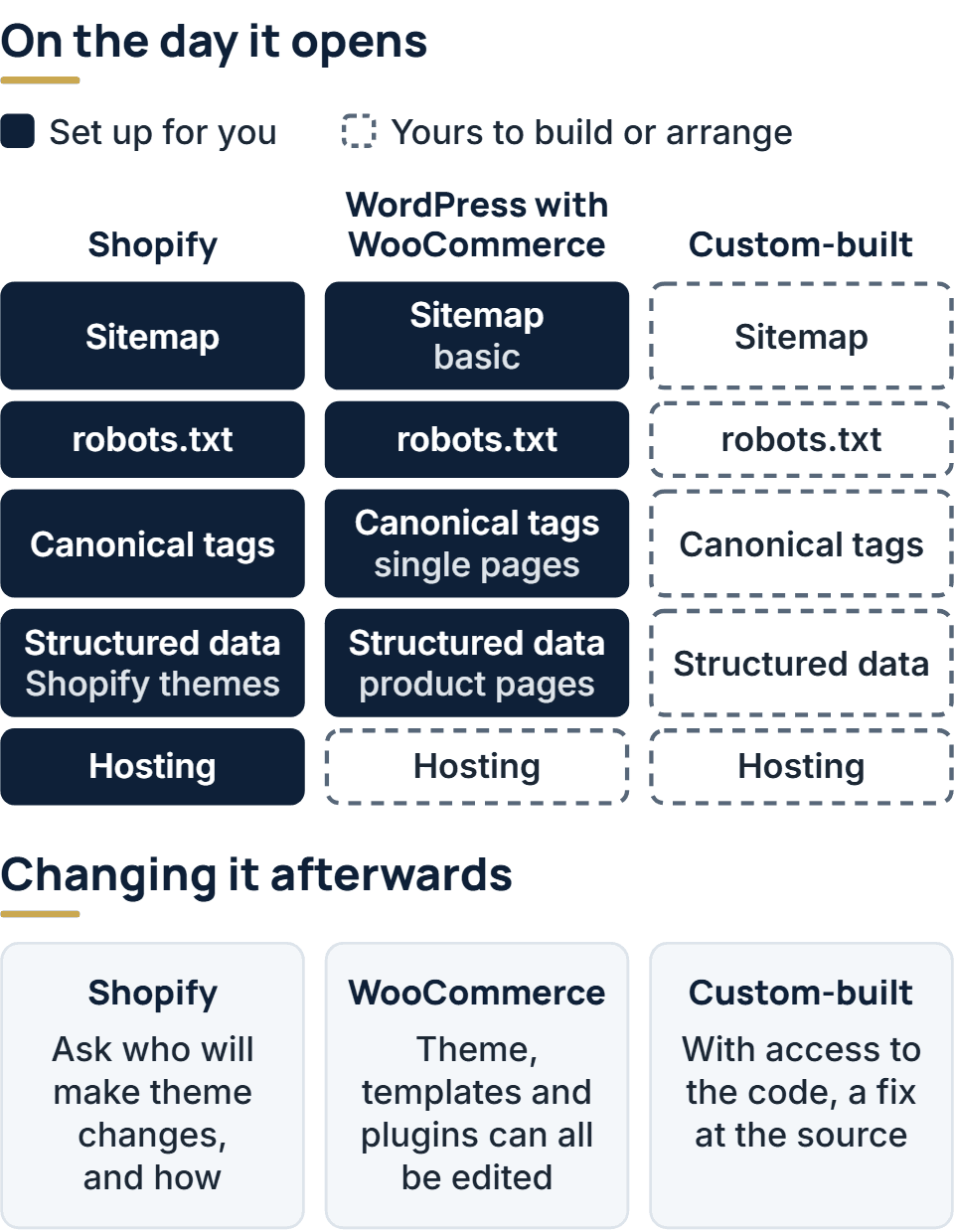
Here are the three side by side, on the things an SEO audit checks first. An audit is a review of the store that lists what is holding it back in search. The Shopify and WooCommerce cells come from each platform’s own documentation, linked in the sections that follow.
| What an audit looks at | Shopify | WordPress with WooCommerce | Custom-built |
|---|---|---|---|
| Sitemap and robots.txt, the files that tell search engines which pages to find and which to skip | Both are generated for you. The robots.txt can be changed only through a theme template | WordPress generates a basic sitemap and a robots.txt that points to it | Has to be built |
| Canonical tags, which name the main URL when several show the same page | Added automatically | WordPress adds them to single pages, such as a product | Has to be built |
| Product structured data, product details such as price and stock, in a form search engines read | Included in Shopify themes | WooCommerce outputs it automatically on product pages | Has to be built |
| URLs | The wording of a page's URL can be edited | The product and category bases are settings. Changing them means pointing the old URLs to the new ones | Any structure you choose |
| Hosting | Included in every plan | You choose the host, and WooCommerce publishes server requirements for it | Yours to arrange |
Does Shopify have good SEO?
For what it sets up, yes. Shopify’s SEO overview lists what a store has without any work: canonical tags on its pages, a robots.txt file, title tags written by the theme, and structured data for products in Shopify themes. Every store also gets a sitemap listing its products, collections, pages and blog posts, and hosting is included in every plan. Titles, descriptions and the wording of a URL can be edited page by page.
Shopify’s documentation also says where its support stops. Changing robots.txt means adding a template to the theme, which Shopify treats as an unsupported customization and warns “can result in loss of all traffic” when done incorrectly. So the question to ask about a Shopify store is who will make theme changes, and how.
What WooCommerce leaves open, and what that asks of you
WooCommerce is an open-source ecommerce platform for WordPress. Because the code is open, a store’s theme, templates and plugins can all be edited, and an audit’s findings can more often be fixed inside the store itself. WooCommerce’s permalink settings let a store set the base of its product and category URLs, and the same page gives the catch: change them and the old URLs return errors unless redirects point them to the new ones.
Some basics are there from the start. WordPress has generated a basic sitemap since version 5.5 and adds a canonical tag to single pages, and WooCommerce outputs structured data for products automatically.
What it asks of you starts with hosting. WooCommerce publishes server requirements for a store’s host, and says a site on a server below them may see security vulnerabilities and poor performance. How fast the pages load depends partly on the host you choose, so speed has to be measured on each store.
Where a custom-built store fits
A custom-built store has no platform setting the limits, so with access to the code a fix can be made at the source of the problem. It also starts with nothing set up. The sitemap, the canonical tags, the product structured data and the redirects exist only if someone built them, which is why an audit of a custom-built store begins by checking that each one is there.
Building a store from scratch suits a business whose catalog or checkout does not fit the way a platform models them, and it needs a team to keep it running.
Choosing a platform or moving to another
If you are choosing, start with who will do the work and how much of the store they will need to alter. A store with nobody to edit templates gains more from the platform that sets up the most for it, and of these three that is Shopify, which also includes the hosting. A store whose team expects to rework templates and URLs gains more from an open one.
If the store already exists, weigh what a move does in search. A move that changes the store’s URLs is what Google calls a site move, and its guidance warns of temporary swings in ranking while the site is recrawled and reindexed. Our advice is to have the store audited where it is before deciding. An audit shows whether the problems it finds can be fixed where the store is.
We do SEO for Shopify, WooCommerce and custom-built stores as a service on its own, including for stores another team built. The first call is free, and the paid audit that follows leaves you with findings that are yours to keep. When the work starts, our team makes the changes with the access you give us, as far as your platform allows. Theme changes are made on a copy of the theme, they go live only after you approve them, and we keep the version they replace.
The full service behind this post: SEO Services for Ecommerce Websites.
Ready to scope your project?
Send us two sentences about what you need. We reply within one business day with the next step and any questions we need answered first.