
Blog
Secure web application development, stage by stage
Secure web application development means deciding security at each stage of a build. Here is where each OWASP Top 10 risk is cheapest to stop.
Secure web application development is the habit of settling security questions while the software is planned and written, and again for as long as it runs. Most flaws have one stage where they are cheap to prevent, and a scan in the week before launch finds only some of them. This guide is for anyone commissioning or running a web application build. It maps each risk in OWASP’s current list to the stage where it belongs, then gives you questions to put to the team doing the work.
What makes a web application secure?
No web application is secure in the absolute. A secure one is an application whose likely risks are known, written down and handled by someone, with evidence that the handling works. Three references are worth knowing by name. The OWASP Top 10 is an awareness document for developers: a ranked list of the most critical risks to web applications. OWASP’s Application Security Verification Standard (ASVS, currently 5.0.0) sets out the security requirements a team can build to and a tester can check. NIST’s Secure Software Development Framework (SP 800-218, version 1.1) looks at the process around the code instead, in four groups: preparing the organization, protecting the software, producing well-secured software and responding to vulnerabilities.
Which security decisions belong before design?
Three questions shape the data model, and the data model is the expensive part to change later.
Who may see and change what? Broken access control is first in the OWASP list, and code cannot enforce a rule that was never written down. List the roles, with what each one can read, change and delete.
Which data is sensitive? Passwords, payment details, health or financial records and personal contact details each need a decision about encryption, retention and who may export them.
What must be recorded? When something goes wrong, someone will need to know who did what, and when. That record has to be designed in, because it cannot be rebuilt after the event.
Written as a requirement, the first answer reads like this example for an imaginary clinic booking tool: a receptionist can see today’s appointments for their own clinic, but not treatment notes. Its check is just as plain. Signed in as a receptionist, request a treatment note by its address and confirm that the server refuses.
The OWASP Top 10:2025, stage by stage
The OWASP Top 10:2025 is the current edition. Compared with 2021, OWASP counts two new categories and one consolidation: Software Supply Chain Failures, which widens the old entry for vulnerable and outdated components; Mishandling of Exceptional Conditions, which is wholly new; and server-side request forgery, now folded into broken access control. The last column is our reading of where each risk is cheapest to stop. It is not part of OWASP’s list.
| Risk | What it looks like in a web app | Cheapest to stop at |
|---|---|---|
| A01 Broken Access Control | A user changes a number in the address bar and sees someone else's invoice | Requirements, then a test for every role |
| A02 Security Misconfiguration | Debug pages, default accounts or open file storage left on in production | Release, with a checked configuration for each environment |
| A03 Software Supply Chain Failures | A package the app depends on, or the tool that builds it, is compromised or out of date | Build, with dependencies pinned and scanned, then for as long as it runs |
| A04 Cryptographic Failures | Sensitive data sent or stored without strong encryption | Design, once the sensitive data has been named |
| A05 Injection | Something a user typed reaches a database query, or a page, as code | Build, with parameterized queries and encoded output |
| A06 Insecure Design | A password reset link that can be guessed, or no limit on attempts | Design, by asking how each feature could be abused |
| A07 Authentication Failures | Weak passwords allowed, sessions that never expire, no second factor where it matters | Design, then build on a proven login library |
| A08 Software or Data Integrity Failures | Updates or data accepted without checking where they came from | Build and release, with a protected pipeline and signed artifacts |
| A09 Security Logging and Alerting Failures | An attack happens and nobody finds out | Requirements for what is logged, then someone who reads the alerts |
| A10 Mishandling of Exceptional Conditions | An error leaves a request half done, or shows internal details to the visitor | Build, by making errors fail closed |
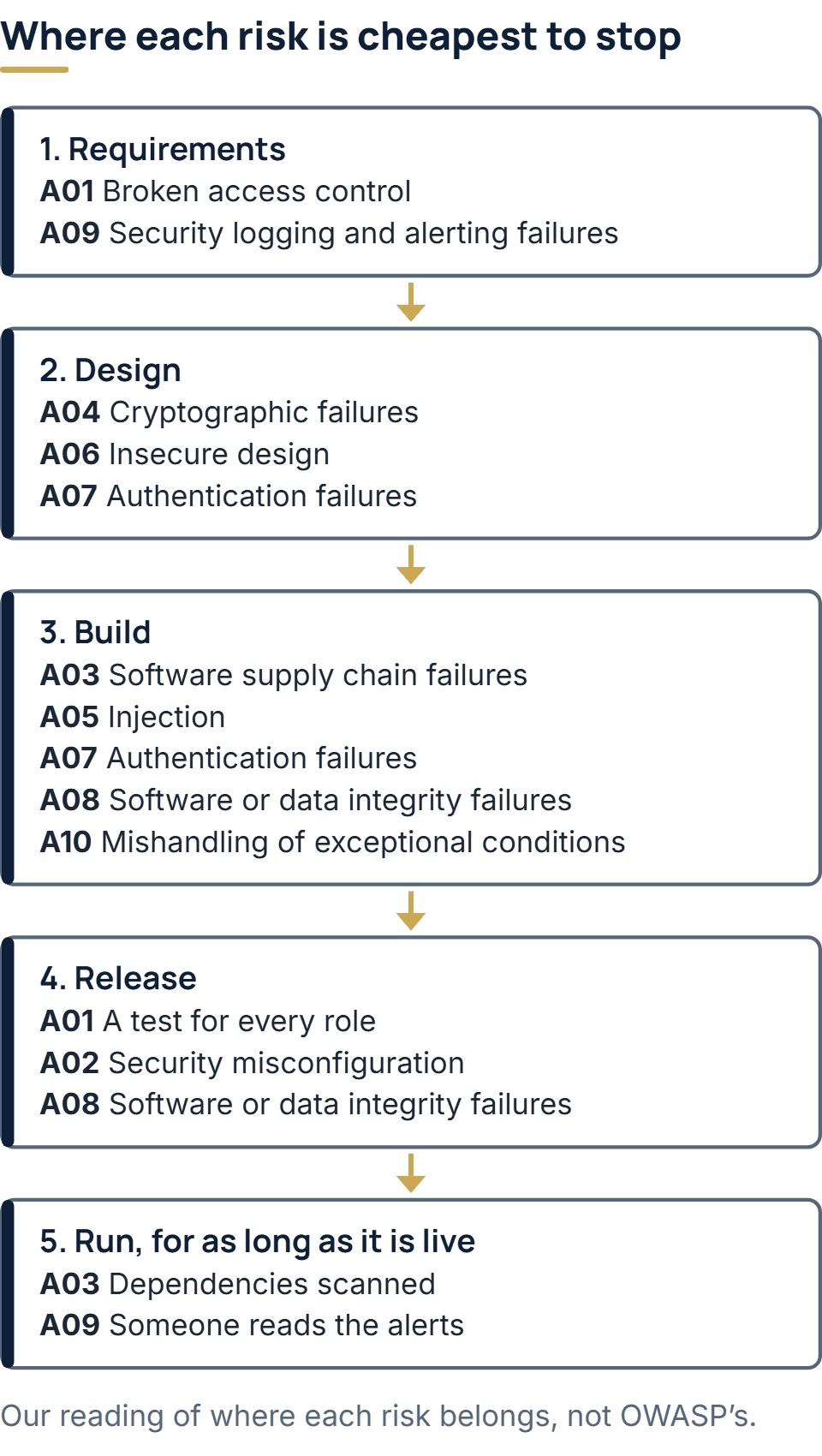
What should happen during the build?
Most of the table’s build column comes down to a few habits, kept on every change.
- Authorization on the server — every request checks that this user may do this to this record, whatever the screen shows.
- Parameterized queries — what a user types is never pasted into a query or a page.
- Secrets outside the code — keys and passwords live in the environment or a secrets store, never in the repository.
- Pinned, scanned dependencies — each package version is fixed, and a scan flags known vulnerabilities before they ship.
- Errors that fail closed — when something unexpected happens, the request is refused and the visitor sees a plain message.
- Review of every change — a second engineer reads the code before it is merged.
Before release, two tests catch what the habits miss. One signs in as each role in turn and tries to reach records that belong to someone else. The other compares each environment’s settings with a written baseline, so a debug switch left on in production is found by the team and not by a visitor.
After launch: keeping it secure
Code that nobody touches still ages. The packages it depends on collect published vulnerabilities, and the language runtime it was written for eventually stops receiving security fixes. A secure application therefore needs an owner after launch: someone who watches the scan results, applies patches, tests them before release and reads the alerts the logs raise. If nobody is named for that work, nobody is accountable when it slips. Under our maintenance retainers, security patches and dependency updates are flagged by dependency scanning, then applied and tested before release. A retainer starts by confirming that the repository, hosting and service accounts are in your company’s name, so control stays with you whoever does the work.
What to ask a development team
Before you hire a team to build or take over a web application, these questions show quickly how it works.
- Where are secrets kept? — A good answer names a place outside the code repository.
- Is every change reviewed? — Yes, by someone other than its author, before it is merged.
- How are dependencies checked? — By an automated scan, with a person responsible for acting on what it finds.
- How is access removed? — When someone leaves the project, their access is revoked at once and someone checks that it was.
- What is logged? — Who changed what and when, in a record the application’s own users cannot edit.
- Who patches it after launch? — A named team, under an agreed scope.
A vague answer to any of these is worth a follow-up question. On our side, code review, dependency scanning, secrets management, access control and audit logging are the five practices on our builds.
The full service behind this post: Software Maintenance Services & Support.
Ready to scope your project?
Send us two sentences about what you need. We reply within one business day with the next step and any questions we need answered first.