
Blog
EHR integration: the routes in, and how to plan the work
EHR integration explained from the standards and US rules: the FHIR, bulk and HL7 v2 routes into a health record, what each allows, and how to plan one.
EHR integration is the work of connecting other software to an electronic health record, so that patient data moves between them without anyone copying it by hand. A scheduling tool reads a patient’s appointments from the record. A lab system sends results back into the chart. A remote monitoring app shows a clinician readings the record never held. In each case the EHR stays the system of record, and the integration decides which data leaves it, which data comes back, and who is allowed to ask. This guide covers the routes into an EHR that the standards and US certification rules define, what each route can and cannot do, and the order in which to plan the work.
The sources are the standards bodies and the regulations themselves: HL7 International’s implementation guides and the US Code of Federal Regulations. For an overview of the systems around the record and the standards each one speaks, start with what software is used in healthcare; this guide picks up where that one stops, at the point where you have to build the connection.
What does EHR integration mean in practice?
It means answering four questions for each flow of data before choosing any technology:
- Direction. Does your software only read from the record, or must it also write to it?
- Scope. Is the request about one patient at a time, or a whole population, such as every diabetic patient of a practice?
- Who is present. Is a clinician or patient signed in and looking at the screen, or does a server run on its own at night?
- Timing. Must the data arrive the moment something happens in the hospital, or is a daily copy good enough?
The answers point to different routes. An app a doctor opens beside a patient’s chart needs a different connection from a nightly report across thousands of patients, and both differ from a feed that tells you the moment a patient is admitted.
The routes into an EHR
| Route | Who starts it | What it suits | What to check first |
|---|---|---|---|
| FHIR API with SMART App Launch | A clinician or patient, signed in | Apps that show or use one patient’s data | Which resources the EHR exposes, and which scopes it grants |
| SMART Backend Services and bulk FHIR export | A server, with no user present | Population data, reporting, analytics | Whether the export covers the groups and resources you need |
| HL7 Version 2 interface | The EHR or a department system, as events happen | Admissions, orders, results, in near real time | The organization’s interface engine and its local message variations |
| The vendor’s own APIs | Your software, under the vendor’s program | Writing data back, or features the standard API lacks | The vendor’s terms, and whether the organization will switch the API on |
An app launched with SMART on FHIR
FHIR is HL7’s web-based standard for health data. SMART App Launch is the HL7 guide that sets out how an app gets permission to use a FHIR API. It defines two ways in. In an EHR launch, a user already working in the EHR opens the app from there. In a standalone launch, the user starts the app from outside the EHR, as a patient does with an app on their phone. US certification rules name this guide for the standardized API that a certified EHR must offer (45 CFR 170.215).
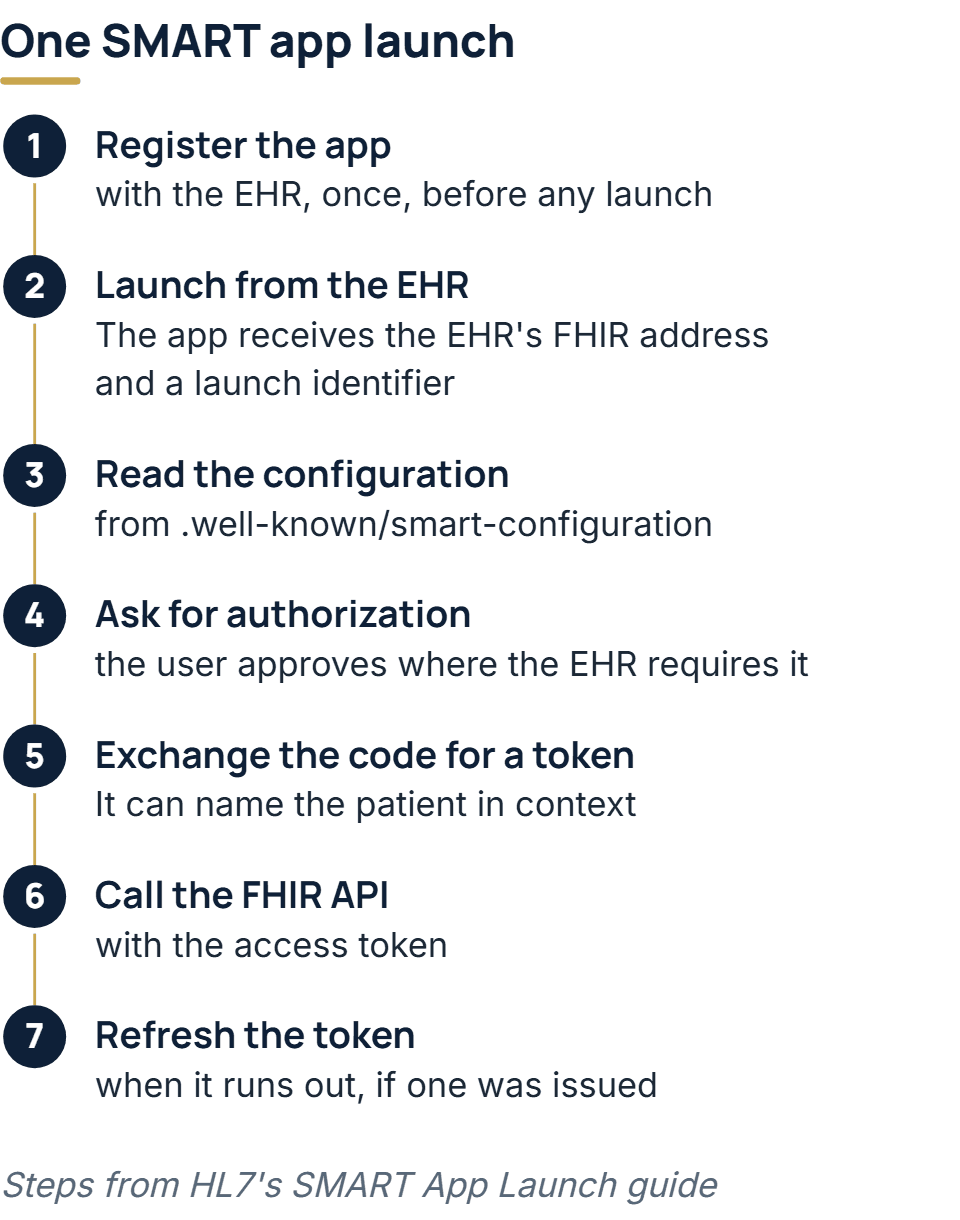
The SMART App Launch guide lays the sequence out in seven steps:
- Register the app with the EHR’s authorization server, once, before any launch.
- Launch. In an EHR launch the app receives two values:
iss, the address of the EHR’s FHIR endpoint, andlaunch, an opaque identifier for this launch and its context. - Read the server’s configuration from
.well-known/smart-configurationat that endpoint, which says where to ask for authorization and tokens. - Ask for authorization. The EHR decides whether to grant the access the app requested. Where its rules call for it, the user signs in and approves first.
- Exchange the code for an access token. When the app was launched in a patient’s context, the token response can say which patient.
- Call the FHIR API with the token.
- Refresh the token when it runs out, if the server issued a refresh token.
Two details catch out teams who have built ordinary OAuth logins before. The guide requires every SMART app to support PKCE, the protection against a stolen authorization code, and servers must refuse its weaker plain variant. And the permissions an app asks for are FHIR scopes, such as read access to one patient’s observations, so the app should request only the resources it will actually use. Expect the health system’s reviewers to read those scopes when they decide whether to approve the app.
A server pulling data in bulk
Some work has no user in the loop: a nightly quality report, a feed into an analytics store, a care management tool that needs every patient in a program. For this, SMART defines Backend Services. The client proves who it is with a JWT signed by its private key, having registered the matching public key in advance, asks for a token with the OAuth client credentials grant, and receives system/ scopes rather than patient or user ones.
With that token, the Bulk Data Access guide lets the client ask for an export of all patients, a defined group of patients, or all the data on the server. The certification rules require only the group export, so check which of the three an EHR offers. The export runs asynchronously. The client sends a kick-off request, receives a status address in the Content-Location header, and checks that address until the server returns a manifest listing the finished files. By default each file is newline-delimited JSON, one FHIR resource per line. An export can partly succeed, in which case the manifest also lists error files, so a client that only checks for success will miss records without noticing.
HL7 Version 2 feeds
Long before FHIR, hospitals connected their systems with HL7 Version 2 messages, and those interfaces are still running. A v2 feed is pushed by events: a patient is admitted, an order is placed, a result is ready. HL7’s v2-to-FHIR mapping guide lists the common message structures, among them ADT_A01 for an admission or visit notification, ADT_A02 for a patient transfer, and OML_O21 for a laboratory order. It also maps ORU_R01, the structure that carries results.
Most hospitals route these messages through an interface engine, which receives each one, transforms it where the receiver needs a different shape and passes it on. Joining that traffic means agreeing on a specification with the organization’s interface team: which events you receive, which segments and fields they fill, and how you acknowledge each message. The local variations HL7 v2 allows are the reason no two feeds are quite alike, as the healthcare software overview explains.
Writing back into the chart
The certified API has a limit that shapes many projects. The US criterion for it, 45 CFR 170.315(g)(10), requires the EHR to respond to requests and searches for a single patient’s data and for multiple patients’ data. It says nothing about creating or updating records. So every EHR certified to this criterion can be read from, for the core data set the rules define, and none is required to accept writes.
So a design that needs to put something into the chart, such as a note, a questionnaire answer or a device reading, has to find out early how that EHR accepts it. The answer may be a write operation in the vendor’s FHIR API, an inbound v2 message through the interface engine, or a document the clinician files. Each one has its own approval path, and the choice can change the scope of the build.
Is HL7 still relevant?
Yes. FHIR has not replaced Version 2 inside hospitals, and the two are built to run side by side. A common pattern is a v2 feed for events that must arrive at once, such as admissions and results, with a FHIR API for an app that looks up the rest of the patient’s record. The US rules still name Version 2.5.1 for reporting to public health agencies and immunization registries (45 CFR 170.205). Anyone integrating with a hospital should expect to meet both standards on the same project.
How to plan an EHR integration
1. Write each flow down
For every flow, record the data it carries, which way it goes, whether it concerns one patient or many, and how fresh it must be. One line per flow is enough. This list is what the EHR vendor, the health system’s IT team and your own developers will all work from.
2. Choose the route per flow
Use the table above. A project often ends up with more than one route, for example a SMART app for clinicians and a v2 results feed into the same backend. That is normal, as long as each flow has one owner and one route.
3. Read the vendor’s API documentation
The certification rule requires the documentation for the certified API to be public, at a link with no preconditions or extra steps. So you can read which FHIR resources, searches and scopes an EHR supports before any meeting. Registration of your app with the EHR’s authorization server is also part of the certified API, though each vendor and each health system runs its own approval process around it.
4. Settle the agreements before the data moves
If your software handles protected health information on behalf of a covered entity, such as a hospital or practice, HIPAA treats you as its business associate. The rules then require a written contract, the business associate agreement, before that information is disclosed to you (45 CFR 164.502(e) and 164.504(e)). Section 164.502(b) also sets the minimum necessary standard: make reasonable efforts to use, disclose and request no more than the task needs. Ask for the narrowest scopes and the fewest resources that do the job, and expect the health system’s security review to check exactly that.
5. Map the codes and the patients
Two systems can agree on FHIR and still disagree on meaning. The US Core profiles call for a LOINC code, where one exists, to say what a lab test measured, RxNorm for medications, and SNOMED CT or ICD-10-CM for problems (US Core). If your software keeps its own lists, map them to these codes and decide what happens to a value that has no match.
Patients need the same care. Your system and the EHR identify a patient by different numbers, so decide early how the two are linked, and what a person does when a match is uncertain. Matching on name and date of birth alone can attach data to the wrong person, because two patients can share both.
6. Test in a sandbox, then in their environment
Build against a vendor sandbox first, since it lets you test the launch, the scopes and the resources with synthetic patients. Then test in the health system’s own non-production environment, where the local configuration and the interface engine’s transformations apply, along with the organization’s real code lists. Data that passed in the sandbox can fail there for reasons that have nothing to do with your code.
7. Log everything and watch for silence
The HIPAA Security Rule requires audit controls that record and examine activity in systems holding electronic protected health information (45 CFR 164.312(b)). Log every request, every message and every token issued. Watch for failures, and also for silence: an interface that stops sending messages raises no error on its own, and the first person to notice may be a clinician looking for a result that never arrived.
What decides how long an EHR integration takes
The code is only part of the timeline. Time also goes into approvals: registering with the vendor’s program, the health system’s security and privacy review, the business associate agreement, and scheduling the interface team. Then come testing in the organization’s environment, mapping codes that do not line up, and agreeing what happens to a message that fails. A read-only SMART app against a well-documented certified API is the lightest case. A two-way integration that writes into the chart through a v2 interface at a hospital is the heaviest. Ask for the vendor’s approval steps and the health system’s review timetable at the start, because they set the date more than the build does.
How we take on an integration project
Healthcare is one of the industries we have worked in, and our engineers have worked under both HIPAA and GDPR. Integration code gets the same treatment as everything else we build: code review, access control and managed secrets, with audit logs built into the systems we hand over. For a new integration, the first scoping call is free. When the work reaches into several of an organization’s existing systems, a short paid assessment comes next: it produces a written map of which systems call which, and which reports depend on which tables, and our quote, fixed and itemized, comes from that map. Linking new software into what an organization already runs belongs to our enterprise software development work.
The full service behind this post: Enterprise Software Development Company & Services.
Ready to scope your project?
Send us two sentences about what you need. We reply within one business day with the next step and any questions we need answered first.