
Blog
Regression testing: what it checks and what to rerun
Regression testing checks that a change has not broken what already worked. What a change can break, which tests to rerun, and how to keep a suite trusted.
Regression testing in software testing is the check that nothing which already worked has been damaged by a change. A developer adds a feature, fixes a bug or upgrades a library, and the regression tests run again over the parts of the software that were not meant to change. If they still pass, what was there before still works. If one fails, the change has a side effect that nobody intended, and it is caught before users find it.
This guide is for people who commission or run software projects. It covers what a change can break, how regression testing differs from retesting a fix, when it is due, how to decide which tests to run again, and how to stop a regression suite turning into noise. Definitions come from the ISTQB Foundation Level syllabus (CTFL 4.0.1, section 2.2.3); the evidence on choosing tests comes from published research and from Google’s book on its own engineering practice. For the wider picture of testing, its types and its principles, start with what software testing is.
What regression testing checks
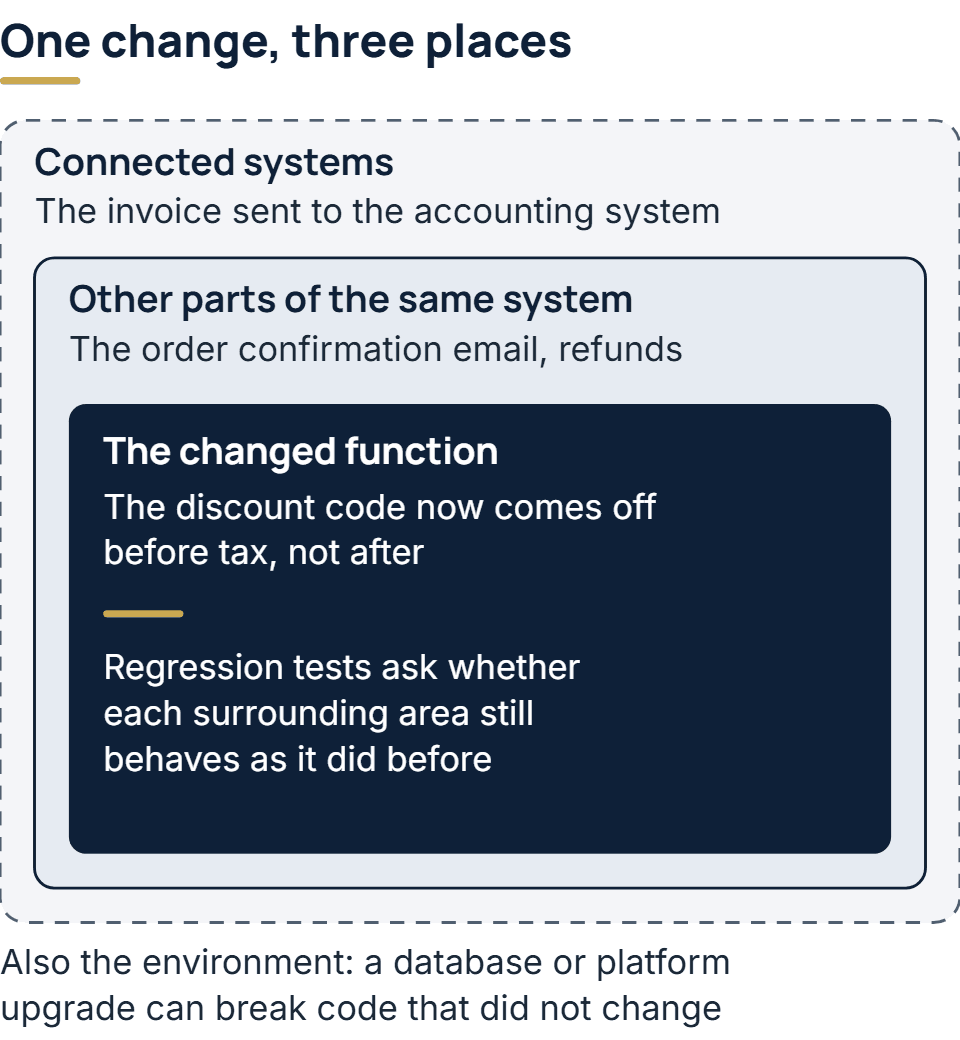
The syllabus defines regression testing as confirming “that no adverse consequences have been caused by a change”. It then names three places those consequences can land:
- The component that was changed. The edit itself can break another path through the same code.
- Other components in the same system. Code that calls the changed part, or reads the data it writes, can start behaving differently.
- Connected systems. Another application that receives data from yours can fail because a field now arrives in a different shape.
It adds a fourth area that is easy to forget: the environment. A new version of a database, an operating system update or a different hosting platform can break software whose own code has not changed at all.
Take an online shop that changes how discount codes are applied, so that a code now comes off before tax rather than after. The change is small and sits in one function. The checkout total is the obvious thing to test. The regression question is wider: does the order confirmation email still show the right figure, does the invoice sent to the accounting system still balance, and do refunds still return what the customer paid? None of those were edited, and any of them could now be wrong.
Regression testing vs retesting
Retesting has a formal name in the syllabus: confirmation testing. The two are often run one after the other, and they answer different questions.
| Confirmation testing (retesting) | Regression testing | |
|---|---|---|
| Question it answers | Is the defect fixed? | Did the change break anything else? |
| What runs | The tests that failed because of the defect, plus any new tests written for the fix | Existing tests over areas the change could affect |
| Where it looks | The place the defect was | Everything around the change, including connected systems |
| When it is enough | When the failure no longer occurs | When the affected areas still behave as before |
The order matters. A fix is confirmed first, and then regression tests run, because, as the syllabus puts it, regression testing covers “a fix that has already been confirmation tested”. A fix that works can still break its neighbors. When time is short, the syllabus allows confirmation testing to shrink to repeating the steps that reproduced the failure. For regression testing it names no such shortcut; how far it reaches is set by the impact analysis described below.
When regression testing is due
Any change can cause a regression, so the triggers are the kinds of change. For software already in use, the syllabus groups them under maintenance testing (section 2.3). Leaving aside retirement, its triggers are:
- Planned enhancements: a new feature in a scheduled release.
- Corrective changes and hot fixes: bug fixes, including urgent ones shipped outside the normal release.
- Upgrades and migrations of the environment: a move to a new platform, a new server, or a new version of something the software depends on. These can also need tests of data conversion when records move across from another application.
Before the first release, the same applies to every change a team makes during development, which is why teams that release frequently run regression tests continuously instead of as a phase at the end. After launch, the environment triggers become more frequent than people expect. Libraries publish security updates, browsers change, and third-party APIs retire old versions. Keeping up with those is adaptive maintenance, and each update is a change that needs a regression run even though nobody touched the product’s features.
How to choose what to rerun
The syllabus advises doing an impact analysis first: working out “which parts of the software could be affected” before deciding how far regression testing should reach. The analysis can be a person reading the change and listing what depends on it, or a tool that follows the code’s dependencies. Either way, it turns a vague worry into a list.
What to do with that list is a trade-off that researchers have measured. A 2001 study in ACM’s Transactions on Software Engineering and Methodology by Todd Graves, Mary Jean Harrold, Jung-Min Kim, Adam Porter and Gregg Rothermel described the main strategies and measured most of them:
| Strategy | What it runs | The trade-off |
|---|---|---|
| Retest all | Every existing test | Finds whatever the suite can find; in the study’s words it “can be prohibitively expensive” |
| Safe selection | Every test that ran code the change deleted, or that will run code the change added or modified | Misses no test that could reveal the fault, provided its conditions hold; on some programs it still selects most of the suite |
| Minimization | The smallest set of tests that covers the changed code | Cheapest to run, and in the study the weakest at finding faults |
| Ad hoc or random | Tests picked by hunch or by chance | Needs no tooling; nobody can say in advance what it will miss |
The point that matters most for a project owner is the trade-off the authors open with: selecting tests cuts the time spent running them but “can discard test cases that could reveal faults”. A smaller run is a bet, and the team should know which one it is making.
Large engineering organizations make that bet with tooling. In Google’s Software Engineering at Google, the chapter on continuous integration describes its test platform using “an analysis of the downstream dependency graph for every change” to run the tests a change could affect. Its rule for what runs before code is merged is short: “only fast, reliable ones”. Slower tests run after the merge, where the chapter says a team can “accept longer times and some instability” if it has a way to deal with them.
Most projects can borrow that shape without the tooling. Fast, dependable tests run on every change. The wider suite, including the slow tests that drive a browser through whole journeys, runs at least before each release. A full run is worth scheduling whenever the environment shifts underneath the software, since a dependency upgrade can affect any part of it.
Building a regression suite that stays useful
A regression suite is made of the tests a project already has, kept and rerun after each change. Three habits decide whether it stays worth running.
Every fixed defect leaves a test behind
The syllabus describes confirmation testing as running the tests that failed because of a defect, or adding tests to cover the fix. Once the fix is confirmed, that test stays in the suite. If the same bug comes back months later, perhaps through a merge that restores old code, it is caught at once. Over time the suite collects a record of every way the software has broken before.
Obsolete tests are removed, not ignored
When a requirement changes on purpose, the tests that described the old behavior are now wrong. The Graves study treats this as a step before any test reuse: a test is obsolete when it checks an input or result that no longer applies, and if obsolete tests cannot be identified, the team cannot judge whether a failure is real. In practice that means updating or deleting tests in the same change that alters the behavior. A red result left in place is one that everyone learns to skip.
A test that fails at random is taken out quickly
The syllabus notes that the number of regression tests generally grows with each release, and a bigger suite has more room for unreliable tests. A flaky test passes and fails with no change to the code. Martin Fowler calls such tests “a virulent infection” for a suite, because once people learn to dismiss one random failure they start dismissing real ones too. His advice, in Eradicating Non-Determinism in Tests (2011), is to move a flaky test into a quarantine area at once, keep it out of the main pipeline, and fix it quickly so the quarantine does not quietly reduce coverage. Google’s chapter makes the same point from the other side: flaky tests “erode confidence similar to a broken test”. The testing guide covers how small failure rates add up across a large suite.
Automating regression tests
Regression tests are the clearest case for automation. The syllabus says so directly: suites run many times and keep growing, “so regression testing is a strong candidate for automation”, and the automation should start early. Where a team uses continuous integration, it recommends including automated regression tests in it.
Automated regression checks come in a few forms, each comparing the changed software with how it behaved before:
- Functional checks compare results: the total, the status, the record saved. These are the bulk of most suites, at the unit, integration and system levels.
- Visual checks compare screenshots. Playwright’s visual comparisons save a reference screenshot on the first run and flag any later difference. Its documentation warns that rendering “can vary based on the host OS, version, settings, hardware”, so the references have to be made and checked in the same environment, or every run reports differences that are not regressions.
- Speed checks compare timings against an earlier build, so that a change which makes a page slower is caught like any other regression.
Some regression checks stay with people. A change to a sign-up flow can pass every scripted test and still confuse users, and only someone looking at it will notice. Automation covers the repetition; it does not replace judgment about what the change was for.
Which tools run regression tests?
A common follow-up question is which testing tools to use. For regression work it helps to start from the jobs the tools have to do. A regression setup needs a test framework in the language of the code, a tool that drives a browser if the product has a web interface, a way to compare screenshots if appearance matters, and a continuous integration service that runs the right tests on every change and reports the result. The testing guide names examples of the first two. The best choice is usually the one the existing codebase already uses, because a regression suite only works if the team maintains it.
What to ask about regression testing on your project
If you are commissioning software rather than building it, these questions show how a team handles regressions without needing to read its code:
- What runs automatically on every change, and what runs only before a release? A clear split is a good sign. “We test before launch” is not an answer.
- When a bug is fixed, is a test added for it? If not, the same bug can return unnoticed.
- How do you decide what to retest after a change? Listen for impact analysis or dependency tracking, and for an honest account of what a partial run might miss.
- What happens to a test that fails at random? It should be quarantined and fixed, not rerun until it passes.
- What is tested after a library, server or platform upgrade? Upgrades are changes too, and they touch everything.
How we handle changes on our builds
On our delivery teams, the person in the QA role checks every release before users see it. No change ships without a code review, and a scan of its dependencies for known vulnerabilities runs as well. On SaaS products, automated tests run ahead of every release that sign in as one customer account and try to see, change or export another account’s records. On live systems we maintain, an update flagged by dependency scanning is applied and tested before it goes out. If you are planning a build through our custom web development service, ask on the first call how a change would be checked on your project.
The full service behind this post: Custom Web Development Services.
Ready to scope your project?
Send us two sentences about what you need. We reply within one business day with the next step and any questions we need answered first.