
Blog
Data migration vs data integration: which one your project needs
A migration moves data to a new home once. An integration keeps live systems exchanging data for as long as they run. Here is how to tell which job you have.
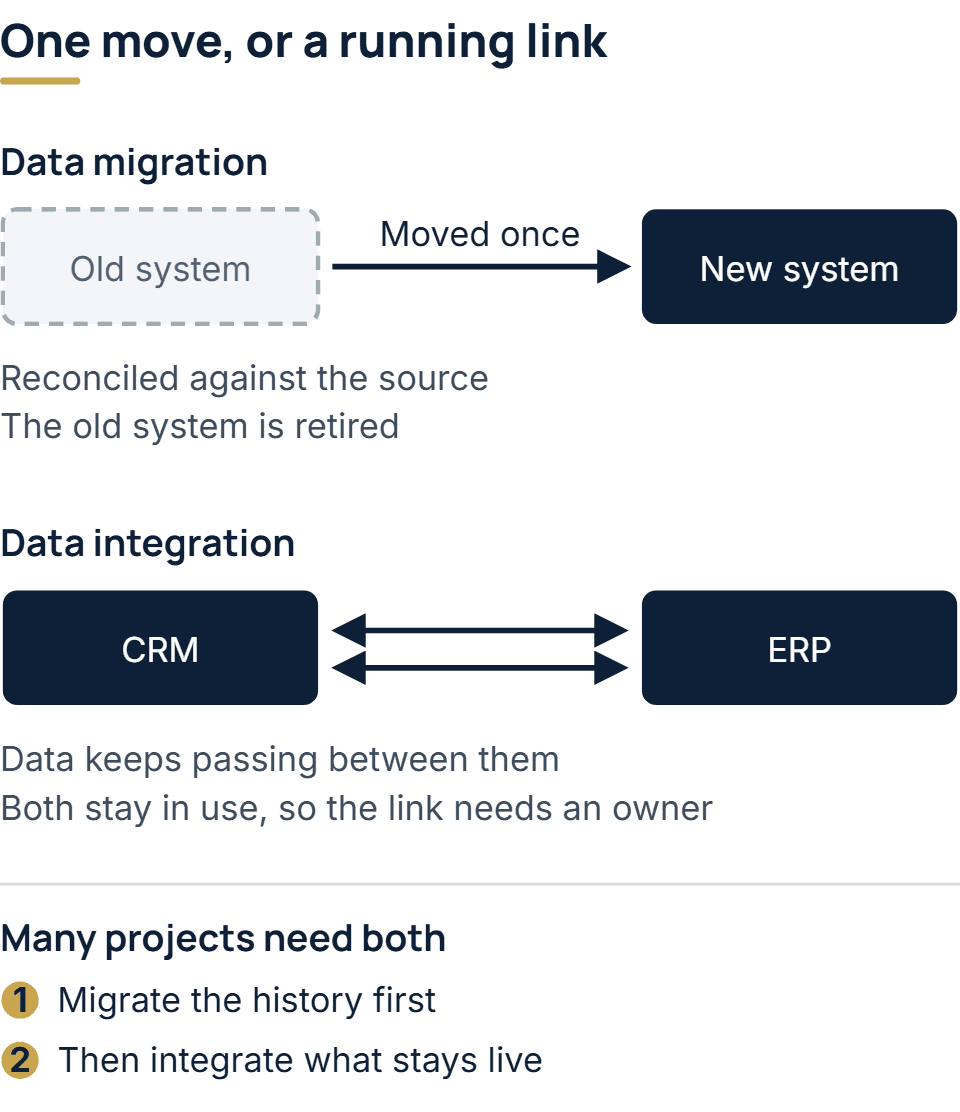
Both terms describe data leaving one system and arriving in another, so they get swapped in proposals and meeting notes all the time. The difference sits in what happens afterwards. A migration has an end date: the data reaches its new home, and the system it came from is retired or kept only as an archive. An integration has no end date: two or more systems stay in use, and data keeps passing between them while they do. Getting the label right early matters, because the two jobs are planned, priced and owned in different ways.
The short answer: one moves data once, the other keeps it moving
Data migration is a project. You copy records out of a system you are leaving, reshape them to fit the system you are moving to, load them, and confirm that what arrived matches what left. When the last batch is accepted, the work is finished and the old system can be retired.
Data integration is a running service. Your CRM and your ERP both stay in use, so every new customer, order or invoice has to show up in the system that did not create it. The connection between them is software in its own right. It needs an owner, it needs watching, and it has to be changed whenever a change on either side touches the data it carries.
What a data migration involves
A migration usually runs through the same handful of steps, whatever the systems are.
- Extract — read the records out of the old system, including the history people forget is there.
- Map — decide where each old field lands in the new structure, and what happens to fields that have no equivalent.
- Cleanse — fix duplicates, empty values and codes that changed meaning over the years, before they are copied into a system that will treat them as current.
- Load — write the records into the new system in an order that respects how they depend on one another, so an invoice never arrives before the customer it belongs to.
- Reconcile — compare what arrived with what left, record by record and total by total, and resolve every difference.
- Cut over — move users and processes to the new system and stop writing to the old one.
When the application moves to a new home as well as its records, the job is a wider one, and our guide to software migration covers the strategies and the ways to cut over.
The step that decides how hard the job is usually turns out to be the cleansing. The amount of data rarely surprises anyone. Its condition usually does: years of records entered by different teams under different rules rarely agree with one another.
What a data integration involves
An integration starts from a different question: how should these systems talk to each other from now on? The answer depends on what each system offers. A documented API is the cleanest route where one exists. Middleware earns its place when several systems all need to agree on the same records. A scheduled transfer of files or batches suits bulk data where a delay of some hours does no harm. A direct connection between two systems is sometimes the simplest safe answer, though a collection of them becomes hard to follow.
Two design decisions matter more than the transport. The first is direction: does data flow one way, or can either system change a record? The second is the source of truth: when the CRM and the ERP disagree about a customer’s address, which one wins? An integration that leaves either question open tends to produce records nobody trusts.
Side by side
| Question | Data migration | Data integration |
|---|---|---|
| How long it lasts | Until the cutover | As long as the connected systems run |
| What happens to the source | It is retired, or kept only as an archive | It stays in use |
| Main risk | Bad or misread history copied into the new system | Systems drifting apart after one of them changes |
| Who owns it afterwards | Nobody: the project closes | Whoever maintains the connected systems |
The deciding question: is the old system being retired?
If the answer is yes, you need a migration. You may still want a temporary link while both systems run side by side, but it ends with the cutover.
If the answer is no, you need an integration, and any “migration” in the plan is really the first load of data into a connection that will keep running. Treating that as a one-off job is how a business ends up with a link nobody owns, which breaks quietly the first time one vendor retires an API version. Keeping integrations working as the systems around them change is ongoing work, the kind covered by software maintenance and support.
A useful test is to ask who will look after the connection a year from now. If the honest answer is “there will be nothing to look after”, it is a migration.
Projects that need both
Many projects are both at once. A company replacing an old order system with a new one keeps its accounting platform. The order history has to be migrated, and the new order system then has to be integrated with the accounts for as long as both run. A manufacturer adding a shop-floor system next to its ERP has the same shape of problem, and the manufacturing software page shows where those two systems usually meet.
The order of work matters here. The history is migrated first, so the new system starts with complete records. The integration is switched on once the new system holds the master copy of whatever it owns. On larger systems, the move often happens in phases rather than in one weekend, with the old system still live and one capability moving at a time.
What goes wrong in each
The failures differ by job.
A migration goes wrong when the data means something different from what its field names suggest. A status code that meant “closed” until a reorganization and “archived” afterwards will load without a single error and still be wrong. That is why reconciliation compares meaning as well as counts.
An integration usually fails at its assumptions. Someone plans against what an API is said to do, and the real behavior, its limits or its gaps, only appears once someone reads the documentation closely or calls it. The other common failure is the one in the side-by-side table: a connection that worked at launch drifts as each system is updated on its own schedule.
How we handle it on an enterprise build
On our enterprise software development work, either job begins with a dependency map: a record of what the existing system calls, what calls it, and which reports lean on its tables. A migration is then done in stages. The old system keeps running while each capability moves across separately, every stage has a way back, and the moved history is reconciled with the source it came from. An integration uses whatever each system makes possible, whether that is a documented API, middleware, or a scheduled transfer of data. The platforms we connect to in production include Microsoft Dynamics 365 and Entra ID, with SAP, Oracle NetSuite and Odoo among ERPs.
When a project involves legacy code or several systems already in place, the free scoping call is followed by a short assessment, which we charge for. Its output is the written dependency map, and our quote is a fixed price broken down part by part on the basis of that map. How clean the data to be moved is counts among the things that change that price, and our cost page explains why we publish no price band.
Questions people ask
Is ETL a migration or an integration?
ETL (extract, transform, load) describes the mechanics, and both jobs can use it. Run once to fill a new system, it is part of a migration. Run on a schedule to keep systems or a reporting database up to date, it is an integration.
Can a migration be done without downtime?
Often, yes, if the move is phased. Running the old and new systems side by side, with one capability moving at a time, keeps the business working while the data changes home. The cost is a period of extra coordination, since both systems are live.
Is data synchronization the same as integration?
Synchronization is one kind of integration: it keeps the same records matching in two systems. Integration also covers one-way feeds, events passed from one system to trigger work in another, and combining data from several systems into one view.
The full service behind this post: Enterprise Software Development Company & Services.
Ready to scope your project?
Send us two sentences about what you need. We reply within one business day with the next step and any questions we need answered first.