
Blog
Enterprise application integration: patterns for ERP and CRM
Enterprise application integration keeps the systems a business runs sharing data as work happens: four styles, five architectures, ERP and CRM flows, failures.
Enterprise application integration is the work of connecting the separate applications a business runs, so that a record created in one reaches the others without anyone retyping it or emailing a spreadsheet. A won deal in the CRM becomes a sales order in the ERP. A shipped order updates stock in the warehouse system, and the invoice it produces shows up for the account manager who sold it. Each application keeps doing its own job, and the integration carries the facts between them. This guide covers what the term means, the styles and architectures an integration can take, the ERP and CRM flows most companies need first, and the failures that a good design plans for.
What is meant by EAI?
EAI is the common abbreviation for enterprise application integration. The term grew up around middleware products sold to large companies that had bought a separate package for finance, sales, manufacturing and HR, and found that none of them talked to the others. The products have changed since then. APIs, cloud integration platforms and event streams now do much of that work, but the problem the term names is the same: several applications, each holding part of the truth about a customer or an order, have to stay in step while the business uses all of them.
Two neighboring jobs are easy to confuse with it. Copying data into a warehouse for reports is data integration for analysis: the copy is read, and nothing flows back into the systems that run the business. Taking records out of a system that is being retired is a migration, a project with an end date; data migration vs data integration sets that difference out. EAI is the running part: operational records passing between live applications for as long as those applications are in use.
What is meant by enterprise integration?
Enterprise integration is the wider umbrella. Besides applications, it can take in data platforms, devices on a factory floor or in the field, and outside parties such as suppliers and customers who exchange orders and invoices electronically. When people say EAI they usually mean the inside part of that picture: the business’s own applications and the flows between them. The rest of this guide stays there.
Four styles of integration
In Enterprise Integration Patterns (Addison-Wesley, 2003), Gregor Hohpe and Bobby Woolf describe four basic integration styles. The vocabulary has outlived most of the products of that era, because every integration built since still uses one of the four or a mix of them.
| Style | How it works | Where it fits | What to watch |
|---|---|---|---|
| File transfer | One application writes a file of records; another picks it up on a schedule | Bulk data where a delay of hours does no harm, and systems with no usable API | A file that fails to arrive, or arrives twice, can go unnoticed for days |
| Shared database | Two applications read and write the same tables | Applications built together, by one team, for one purpose | Neither can change its data model without breaking the other |
| Remote procedure invocation | One application calls a function the other exposes, today usually a REST or SOAP API, and waits for the answer | A user waiting on a result, such as a stock check during checkout | When the called system is slow or down, the caller is slow or down too |
| Messaging | Applications send messages through a broker, which holds them until the receiver is ready | Events that many systems care about, and receivers that go offline | Messages can be delivered more than once, or out of order, unless the design handles it |
Hohpe and Woolf also say that no single style suits every case, and that the right choice is made for each integration rather than once for the whole company. In practice a company ends up with a nightly file from an old payroll system, API calls for live lookups, and messages for the events everybody needs. That mix is fine, provided someone can say which flow uses which style and why.
How the connections are arranged
The style says how two applications exchange data. The architecture says how all the connections in the company are laid out. Five arrangements cover most of what you will meet.
| Architecture | Shape | Where it fits | What to watch |
|---|---|---|---|
| Point to point | Each pair of applications is wired directly | Two or three systems with one or two flows between them | The number of links grows much faster than the number of systems |
| Hub and spoke | Every application connects once, to a central hub that routes and translates | A handful of core systems that all need the same records | The hub becomes a single point of failure and a queue of change requests |
| Enterprise service bus (ESB) | A shared messaging backbone with routing, translation and adapters for each system | Large estates with many older systems and an integration team to run it | Business rules creeping into the bus, where nobody else can see them |
| Integration platform as a service (iPaaS) | A hosted platform with ready connectors for common SaaS products | Mainly cloud applications that the platform already has connectors for | Per-connection or per-transaction pricing, and logic held in a vendor’s tool |
| Event-driven | Applications publish events (“order shipped”) and any interested system subscribes | Many consumers of the same events, and systems that should not wait on each other | Harder to trace one record end to end, and duplicates and ordering to handle |
The arithmetic behind the first row is worth seeing once. Wired point to point, six systems can need up to fifteen links, one for every pair, and many of those links carry data both ways. Through a hub, the same six need six. A seventh system adds up to six new links point to point, and one through a hub.
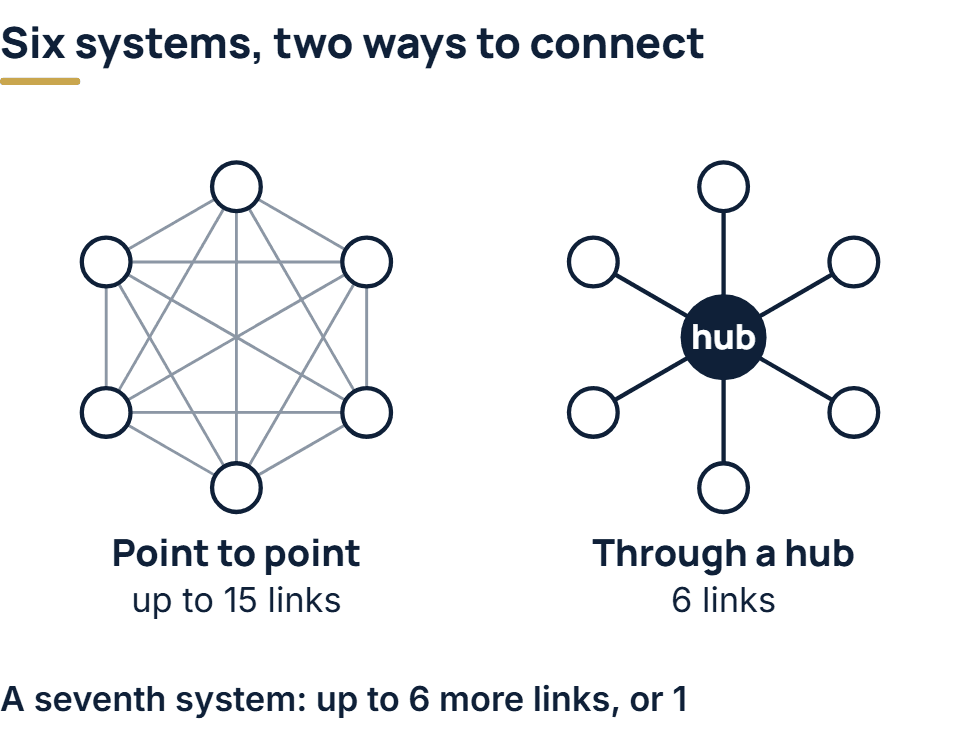
That does not make point to point wrong. Two systems with one flow between them need no hub, and a hub built for a future that never comes is cost with no return. The arrangement starts to hurt when nobody can list the links any more, which is usually the moment a third or fourth system joins.
ERP integration: what flows, and which system owns it
ERP integration connects the system that holds a company’s orders, stock and accounts to everything around it: the CRM, the online store, the warehouse, the billing platform. The first decision is the one most often skipped. For each kind of record, one system is the owner, the place where that record is created and corrected, and every other system holds a copy.
The table shows a common split. Your own may differ, and the point is that it is written down, not that it matches this one.
| Record | Usual owner | Usual direction | Usual timing |
|---|---|---|---|
| Prospect, contact, opportunity | CRM | CRM to ERP only once a deal is won | When the deal is won |
| Customer account and billing details | ERP, once the customer has ordered | ERP to CRM | Near real time |
| Item, product and price list | ERP | ERP to CRM and store | On change, or a few times a day |
| Sales order | Created in the CRM or store, owned by the ERP once accepted | Into the ERP, status back out | As it happens |
| Stock available to sell | ERP or warehouse system | Out to the store and CRM | As often as the sales channels need |
| Invoice, payment, credit hold | ERP | ERP to CRM | Daily or on change |
Writing records into an ERP needs more care than reading from it. The ERP posts to the general ledger, numbers its documents in sequence, and checks rules the business set up years ago. An integration that writes there should go through the ERP’s own documented interfaces, so those rules still apply, rather than straight into its tables. Most of the hard questions in an ERP project turn out to be about that edge: what the ERP does when an order arrives for an item it no longer sells, a customer over their credit limit, or a price that changed since the quote.
CRM integration: the handoff from sale to invoice
CRM integration is mostly about one handoff and the information that flows back after it. Sales works in the CRM until the deal is won. From then on the order, the invoice and the payment live in the ERP, and the account manager still needs to see them without logging in to a second system.
Three details decide whether people trust the result.
- Matching records across systems. Each system gives the customer its own ID. The integration stores the other system’s ID beside its own, so an update finds the right record instead of creating a second one. Matching on a name or an email address alone is how duplicate customers multiply.
- Field-level ownership. The CRM may own the contact’s phone number while the ERP owns the billing address on the same customer. When both systems can edit both fields, a change in one is quietly overwritten by an older copy from the other.
- Platform limits. CRMs ration API calls. HubSpot’s usage guidelines, for a privately distributed app, allow 100 calls per 10 seconds per app on the Free and Starter tiers and 190 on Professional and Enterprise, with a daily ceiling per account of 250,000, 625,000 or 1,000,000 calls by tier. Microsoft documents service protection limits for Dataverse, the data platform under the Dynamics 365 sales and service apps: by default 6,000 requests per user in a five-minute window on each web server, and a cap on concurrent requests of 52 (higher in some environments), with a note that these limits can change. Past either limit the platform refuses the call: HubSpot with a 429 response, Dataverse with 429 over its web API or a service fault through its SDK, each with a time to wait before retrying. An initial load of every past customer and order is where a design meets these numbers first.
Microsoft’s own advice in that page is to move away from large nightly or monthly jobs that push a lot of data through in a short time, and toward integration that sends changes as they happen. For most CRM flows that is also what the sales team wants.
How integrations fail, and the design that survives it
An integration that works on the day it goes live can still be quietly wrong a month later. The faults are well known, and each has a standard answer.
The same message arrives twice. Most message brokers, as normally configured, deliver every message at least once, which means sometimes more than once. Amazon’s documentation for its SQS standard queues says plainly that an application may receive a copy of a message again, and tells developers to make their applications idempotent: unharmed by processing the same message more than once. Microsoft’s Idempotent Consumer pattern gives the method. Key each message on a stable identifier, record the ones already processed, and prefer operations that are naturally safe to repeat, such as an update keyed on the order number rather than “add one more order”.
A call fails and is retried. Networks drop and services get busy, so a call that fails once often succeeds a moment later. Microsoft’s Retry pattern describes retrying after a delay, lengthening the delay between attempts where the failure calls for it, stopping after a set number, and treating the final failure as an exception to be handled rather than ignored. It also warns that retrying an operation that is not idempotent can run it twice. A retried “create invoice” call that had in fact succeeded is how a customer receives two invoices.
A failure nobody sees. The worst integrations fail silently: a scheduled file that never arrived, a message parked in an error queue that nobody reads. Every flow needs a named person who is told when it fails, and a regular check that counts records on both sides, such as orders accepted in the ERP against deals won in the CRM, so a gap shows up in a day rather than at month end.
Updates out of order. If a customer’s address changes twice in a minute, the two messages can arrive in either order, and the older one can win. Carrying a version number or a timestamp from the owning system lets the receiver ignore an update older than the one it already holds.
One side changes. A vendor retires an API version, or an administrator renames a field. An integration with a written record of every field it reads and writes, and tests that run against each system’s test environment, catches that before production does.
A one-page brief for each flow
Before any integration is built, it pays to write one short brief per flow. Nothing in it needs special tools, and it is the document that settles arguments a year later.
- The record, and its owner. What is being moved, and which system is the master for each field.
- Direction. One way, or both, and if both, which side wins a conflict.
- Trigger and timing. On an event, on a schedule, or on request, and how stale the copy may be before it causes harm.
- Matching. Which identifier links the record in one system to the same record in the other.
- Volume. Records per day and at peak, set against each platform’s published API limits.
- Failure. How many retries, where a failed record is parked, and who is told.
- Reconciliation. The count or total checked on both sides, and how often.
- Change. Who must be told before either system changes a field this flow uses.
A flow whose brief cannot be filled in is not ready to build. The gap is nearly always a business question that nobody has answered: which department’s version of the customer is right.
How we approach integration work
We pick the style for each flow from what the systems at both ends support. A documented API comes first wherever one exists. Middleware comes in when several systems must agree on the same records, and a scheduled transfer when the data is bulk and a delay of hours is acceptable. A direct link between two systems is used where it is genuinely the simplest option that stays safe. Platforms we have delivered integrations for include Microsoft Dynamics 365 and Microsoft Entra ID. Among ERPs they include SAP, Oracle NetSuite and Odoo, connected on the business side for orders, inventory and finance. Among CRMs they include Salesforce, HubSpot, Zoho CRM and Pipedrive.
The first scoping call is free. If the work reaches into several of your existing systems, we follow it with a short paid assessment. Its output is a written map of dependencies, showing which systems call each one, which ones it calls in turn and which reports draw on which tables, and we itemize our fixed quote from it. Code review, secrets management and access control apply to integration code as they do to everything else we build. Our enterprise software development services page shows where integration fits within building and connecting larger systems.
The full service behind this post: Enterprise Software Development Company & Services.
Ready to scope your project?
Send us two sentences about what you need. We reply within one business day with the next step and any questions we need answered first.