
Blog
What is enterprise software? Meaning, types and examples
Enterprise software runs an organization's shared work. Six checks that make a product enterprise, the main types with examples, and how to manage the estate.
Enterprise software is software an organization buys or builds to run work that many people share: the ledger, the customer records, the staff files, the tickets. A consumer app is picked by one person for their own use. An enterprise system is chosen by the organization, signs people in through the organization’s own accounts, gives each of them a role, keeps a record of who changed what, and exchanges data with the other systems the business already runs. The company may have forty staff or forty thousand. The word describes the buyer and the job, not the headcount.
This guide is for people who have to choose, replace or look after these systems. It covers what the term means, six checks that tell an enterprise product from a tool that only calls itself one, the main types with examples of each, one transaction followed through the systems it touches, and how an organization keeps track of all of it. Along the way it answers four questions people often ask about the term.
Enterprise software, defined
IBM’s explainer on enterprise applications draws the line against consumer software: consumer applications are typically designed for individual users, while enterprise applications aim at the efficiency and effectiveness of an organization’s business processes. AWS’s page on what enterprise software is lists the common types as contact center software, business intelligence, enterprise communication, inventory management, marketing tools, online payments and enterprise resource planning.
Both definitions point at the same thing. The software is organized around shared records that outlast any one user, and the people who work in those records have different jobs. That has consequences you can see in the product:
| Question | Consumer software | Enterprise software |
|---|---|---|
| Who chooses it | The person who uses it | The organization, often after a trial and a contract review |
| How people sign in | An account each person creates | The organization's identity provider, so one company login works everywhere |
| Who owns the data | The individual, under the vendor's terms | The organization, which expects to be able to export all of it |
| What each user can do | Everything their own account allows | What their role allows: a clerk enters, a manager approves, an auditor reads |
| How it changes | Updates arrive and the user adapts | Changes are planned, tested and announced, because teams depend on them |
| How it is paid for | Free, one-off or a personal subscription | Per user, per module or by usage, under a contract with support terms |
What is enterprise application software?
It is the same thing under a longer name, and the extra word does a job. “Application” separates the systems people do their work in, such as finance, sales and HR, from the infrastructure underneath them: operating systems, databases, networks and the servers or cloud accounts that host it all. An organization buys both, but only the first is what people mean when they ask which enterprise software a company uses. Many enterprise applications are web applications that staff open in a browser, often with a mobile app for the jobs done away from a desk.
Six checks that make software enterprise
A product’s marketing can say “enterprise” without meaning much. These six checks show whether the product can actually carry an organization’s work. The question in the middle column is the one to put to a vendor, or to the team building the system.
| Check | What to ask | The standard or term behind it |
|---|---|---|
| 1. Roles | Can permissions be set by role, so a clerk and an approver see different things in the same records? | Role-based access control. NIST's model, formalized in 1992 by Ferraiolo and Kuhn, became the ANSI/INCITS 359 standard in 2004 |
| 2. Company sign-in | Do people sign in through the organization's identity provider, instead of a password the product keeps? | Single sign-on over SAML 2.0 (an OASIS Standard since March 2005) or OpenID Connect, an identity layer on top of OAuth 2.0 |
| 3. Joiners and leavers | When someone joins, changes job or leaves, does their account follow without anyone opening the product? | Provisioning, usually over SCIM 2.0 (IETF RFC 7643 and RFC 7644, September 2015) |
| 4. Audit log | Can you see who changed a record, when, and what it said before? | An audit trail, kept where users cannot edit it |
| 5. Connections | Is there a documented API, and can every record be exported? | APIs, webhooks, scheduled exports |
| 6. The organization as customer | Is there an admin console the organization controls, a contract with support terms, and a way to take all the data back at the end? | Service-level agreement, data processing terms, exit and export clauses |
The NIST page on role-based access control explains why the first check matters: setting permissions person by person gets expensive and error-prone as an organization grows, and roles cut that cost. The second and third checks are where small business tools most often fall short. A product that keeps its own passwords leaves an account open when an employee leaves, until someone remembers to close it. The SCIM protocol exists so the identity provider can create, update and remove those accounts itself.
If a product’s pricing page has an “Enterprise” tier, compare it with this table line by line. It tells you which of the six you would be paying extra for, and which the cheaper tiers leave out.
What is an enterprise application with an example?
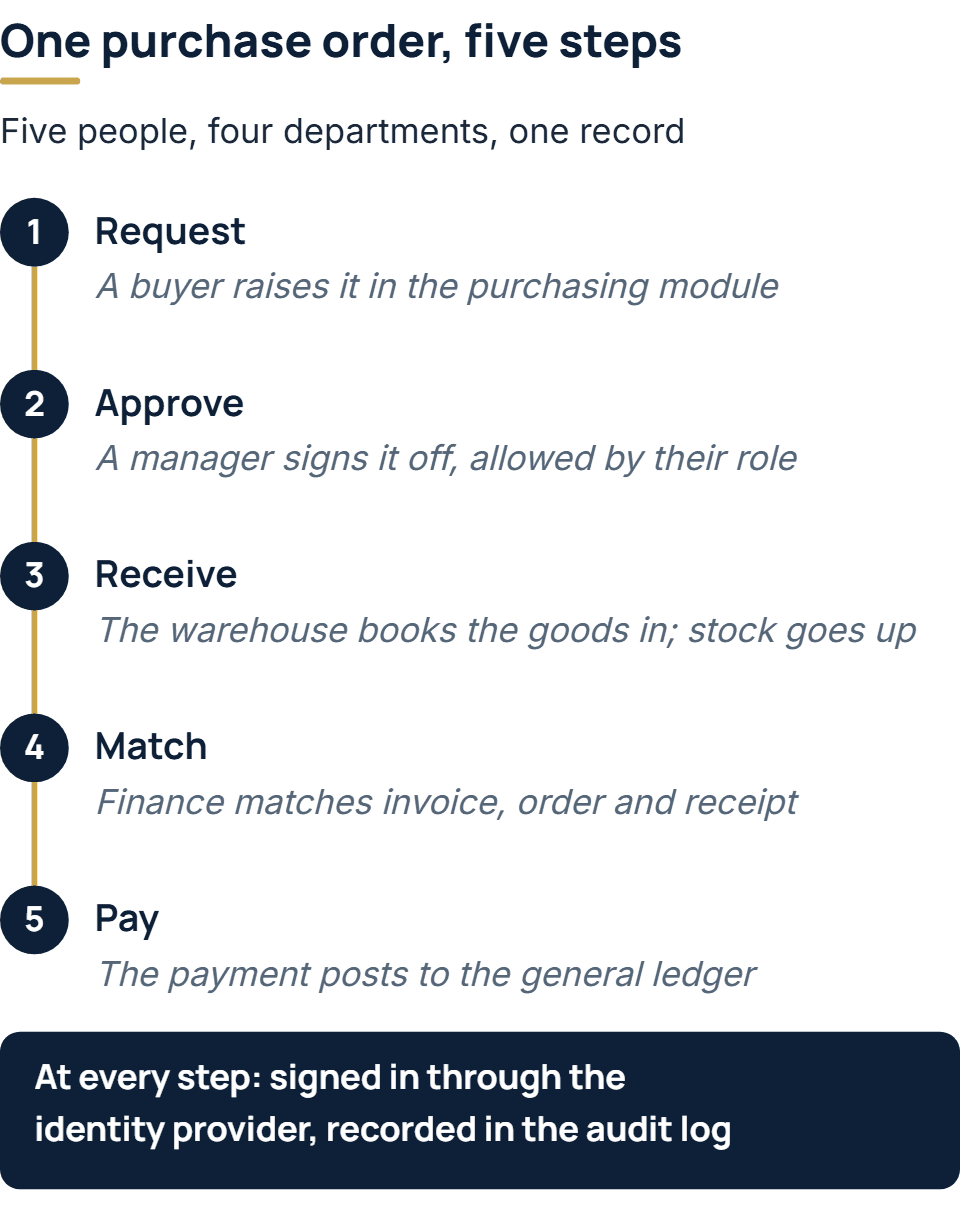
Take a purchase order, the paperwork behind almost every company’s spending. Following one shows where each of the six checks earns its place.
- Request. A buyer raises the order in the purchasing module of the ERP. The buyer signed in with a company account, and the buyer’s role allows orders up to a set amount.
- Approve. The buyer’s manager finds the order in a queue and approves it. The system allows that because the manager’s role includes approval for the department, and it records the decision with the time.
- Receive. When the goods arrive, someone in the warehouse books them in against the order. Stock rises in the inventory records, which the sales team’s system can read.
- Match. The supplier’s invoice arrives. Finance checks it against the order and the goods receipt, a control accountants call a three-way match, and the system flags any line where quantity or price disagrees.
- Pay. The approved invoice is paid and the payment posts to the general ledger, where the month’s accounts will pick it up.
Five people in four departments touched one record, and none of them retyped anything. Each saw only what their job needed. If an auditor asks next year who approved that order and when, the answer is in the log. A shared spreadsheet can hold the same order, but it cannot do any of that.
What are some examples of enterprise products?
The clearest way to sort enterprise software is by the record each type is responsible for. Many organizations end up with one system per row of this table, from different vendors, plus the connections between them. The products named are examples of each category, not recommendations.
| Type | The records it owns | Who works in it | Examples |
|---|---|---|---|
| ERP (enterprise resource planning) | The general ledger, purchasing, sales orders, stock, and often production | Finance, purchasing, operations | SAP S/4HANA, Oracle NetSuite, Dynamics 365 Business Central, Odoo |
| CRM (customer relationship management) | Contacts, accounts, deals, service cases | Sales, account management, support | Salesforce Sales Cloud, HubSpot, Dynamics 365 Sales |
| HR and human capital management | Employees, contracts, leave, pay, reviews | HR, payroll, every manager | Workday, SAP SuccessFactors |
| Identity and access | Who each person is and which systems they may use | IT and security | Microsoft Entra ID, Okta |
| IT service management | Incidents, requests, changes, IT assets | IT teams, and every employee who raises a ticket | ServiceNow, Jira Service Management |
| Business intelligence | Little of its own: it reads the systems above and reports across them | Leadership, analysts, finance | Microsoft Power BI, Tableau |
| Collaboration and communication | Messages, meetings, shared files | Everyone | Microsoft Teams, Slack, SharePoint |
| Contact center | Calls, chats, queues, recordings | Customer service | Amazon Connect Customer, Genesys Cloud |
Two patterns are worth noticing. The identity provider is enterprise software in its own right, and it is the one every other system on the list depends on for sign-in. Business intelligence holds almost no records of its own: its value comes from reading several systems that disagree, which is why reporting projects so often turn into data-quality projects. Where two systems hold the same customer, one of them has to be named the owner of each field, and the work of keeping them in step is enterprise application integration.
What are the 7 categories of software?
There is no standard list of seven. Textbooks and course notes sort software in different ways and arrive at different counts. One sort that is useful when buying goes by what the software is for:
- System software. Operating systems and device drivers, which run the hardware.
- Utility software. Backup, antivirus, file compression: upkeep for the machine and its data.
- Programming software. Compilers, code editors and test tools, used to make other software.
- Middleware. Message queues, integration platforms and API gateways, which carry data between applications.
- Consumer application software. Apps a person chooses for their own use.
- Enterprise application software. The systems an organization runs shared work on, which is the subject of this guide.
- Embedded software. Firmware inside machines and devices, from routers to factory equipment.
On this sort, enterprise software is application software bought by an organization instead of a person. It leans on most of the other categories: it runs on system software, it is written with programming software, and middleware often connects it to its neighbors.
How enterprise software is delivered and paid for
The same product can reach an organization in more than one way, and the choice affects cost, control and who does the upkeep.
- Software as a service. The vendor hosts and runs it, and the organization pays a subscription, usually per user per month or per module. Upgrades arrive on the vendor’s schedule.
- On-premises. The organization installs it on servers it runs, traditionally under a perpetual license plus a yearly maintenance fee. It controls upgrades and carries the work of applying them.
- Private cloud or vendor-managed hosting. A middle route: a dedicated copy run in a cloud account, by the vendor or a partner, for organizations that need tighter control over where data sits.
- Custom-built. Software written for one organization, owned by it, and paid for as a project with support afterwards. It is the usual answer where a standard product stops short of how the business competes, often as a layer that extends a product rather than a replacement for it.
Prices vary too widely to quote in a guide, and they depend on the number of users, modules and integrations. The useful comparison is total cost over the years you expect to keep the system: licenses or subscriptions, setup and data migration, integrations, training, and the staff time to run it.
What is replacing ERP?
Nothing has replaced it as a category. Any business that buys, sells and keeps accounts still needs one ledger that orders, invoices and stock all post to, and that is what an ERP is. The question usually picks up two changes in how ERP is bought and arranged.
The first is hosting. Many ERP products are now sold as subscriptions that the vendor runs, alongside editions a company installs on its own servers. The second is scope. Rather than one suite for everything, an organization can keep the ERP to its core of finance, purchasing and stock, and put specialized applications for sales, HR or the warehouse around it, connected through APIs. That arrangement can let each team use a better tool, but it moves the hard work from configuring one product to keeping several in agreement. An ERP that has stopped meeting the business’s needs and has become hard to change is what we describe as a legacy system; replacing it is rarely the only option.
What is enterprise software management?
The phrase covers looking after the whole set of systems, as opposed to any one of them. In a growing company the estate drifts: tools get bought by one team, renewals roll over without review, and accounts outlive the people they belonged to. The fix is unglamorous: keep one register, and give each system a row with these columns:
| Column | Why it is there |
|---|---|
| System and what it is for | So nobody buys a second tool for the same job |
| The records it owns | So that when two systems disagree, everyone knows which one is right |
| Business owner and technical owner | One person decides how it is used; another keeps it running |
| How people get access | Ideally a group in the identity provider, so access follows the job |
| What it connects to, in and out | So a change in one system does not silently break another |
| Renewal date and notice period | So the decision to keep, renegotiate or leave is made in time |
| How to export everything | So leaving is possible, and tested before it is needed |
| Where the audit log is | So questions about who did what have an answer |
Three routines keep the register true. Accounts change when people join, move or leave, preferably through the identity provider so nobody has to remember. Someone reviews who has access to the sensitive systems on a fixed cycle, such as each quarter. And each renewal is reviewed well before its notice period opens, which is the moment an organization has the most choice.
How we work on enterprise systems
Our enterprise software development work starts from the estate an organization already has. Every change is code reviewed before it ships, and a scanner checks the libraries it depends on for known vulnerabilities. The systems we deliver keep secrets out of the code, control access, and keep an audit log. In production, our integrations connect to Entra ID for sign-in, to Microsoft Dynamics 365, and to SAP, Oracle NetSuite and Odoo for ERP, all of it on the business side: orders, stock and finance. On the web applications we build, the handover pack explains the architecture, sets out who can do what in a written roles-and-permissions model, and includes a runbook for whoever operates the system. The client owns what we write: our contracts transfer the code and the IP to them.
Scoping starts with a call that is free. When the work touches several systems already in place, we run a short paid assessment first. It ends in a written dependency map, and the fixed quote is itemized against that map.
The full service behind this post: Enterprise Software Development Company & Services.
Ready to scope your project?
Send us two sentences about what you need. We reply within one business day with the next step and any questions we need answered first.