Blog
What is a legacy system? Meaning, examples and how to tell
A legacy system is software a business still depends on but can no longer keep patched or change safely. Real examples, the risks, and a check to run on yours.
A legacy system is software, sometimes with the hardware under it, that a business still relies on for real work but can no longer keep patched or change with confidence. Age alone does not make a system legacy. A twelve-year-old application on a supported platform, with tests and people who know it, is simply mature. A three-year-old one built on a framework its maintainers have abandoned is legacy already. Familiar examples include programs written in Visual Basic 6 or COBOL, scripts still running on Python 2, and internal tools built on versions of .NET Framework that Microsoft has retired.
What does legacy system mean?
The word comes from inheritance. In everyday English a legacy is something handed down, and in IT it means a system the current team inherited and must keep running, whoever first built it. The same sense covers a legacy program, a legacy application or a legacy process: something still in use because the work depends on it, not because anyone would pick it again today.
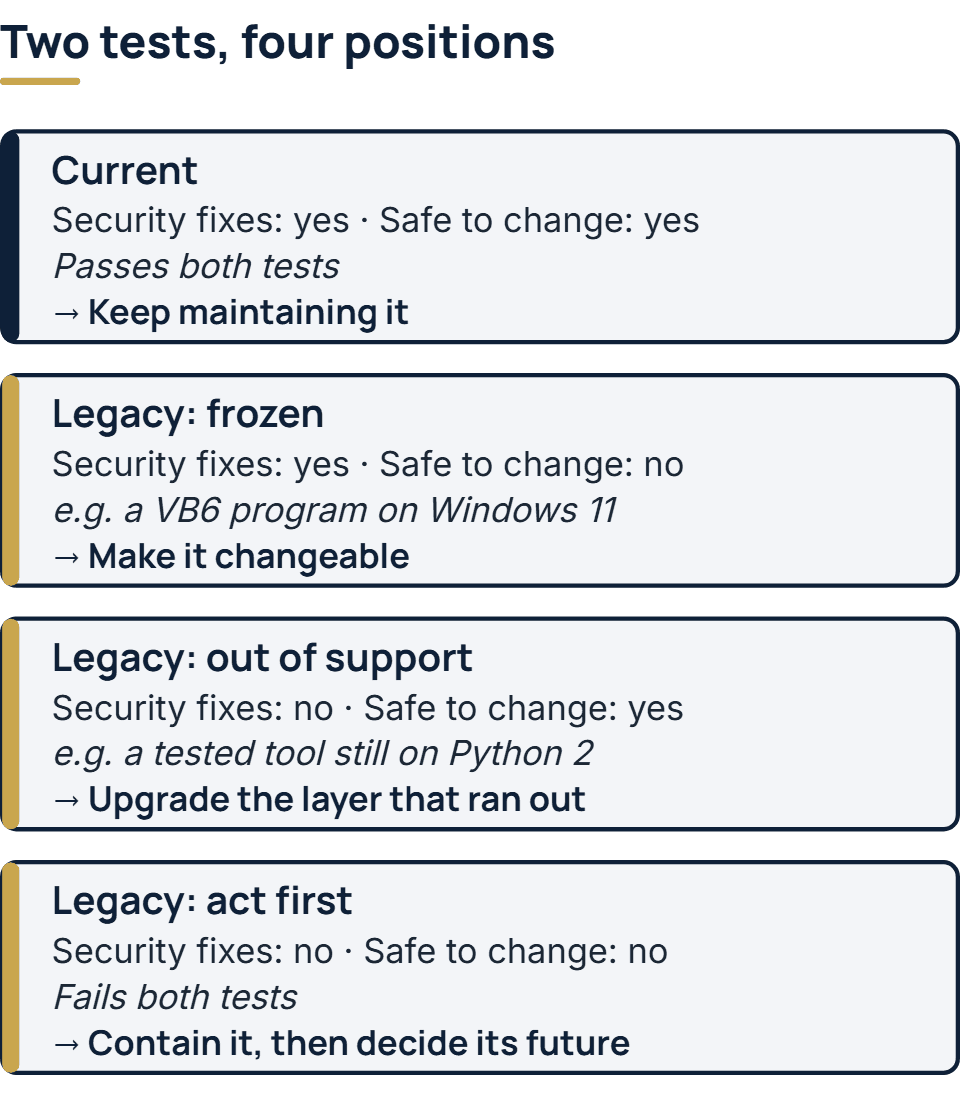
Two tests decide it. A system that fails either one is legacy.
- Does every layer still get security fixes? The layers are the operating system, the language runtime, the framework, the database and any component bought in. Once one of them is past its vendor’s end of support, the next vulnerability found in it stays open.
- Can your people still change it safely? That takes someone who understands the code, a way to build and release it from its source, and some means of knowing that a change has not broken something else.
The US Government Accountability Office (GAO), which audits federal agencies, describes legacy systems by their consequences: aging systems that are expensive to keep running and exposed to attack. Those are what failing the two tests costs.
Legacy system examples
- Visual Basic 6 programs. Microsoft ended support for the Visual Basic 6.0 development environment on April 8, 2008. Its support statement for Visual Basic 6.0 still covers the runtime on current Windows, for serious regressions and critical security issues only, so a VB6 program that uses only Microsoft’s own runtime files remains supported on Windows 11. Third-party controls are not covered. There is no supported way to change the program, and Microsoft recommends replacing such applications. One built on the supported files passes the first test and fails the second.
- Code on Python 2. The Python project retired Python 2 on January 1, 2020, and said it would not improve it again, even for a security problem. Scripts written for it still turn up in data jobs and server automation.
- Older .NET Framework versions. Microsoft’s .NET Framework lifecycle page shows versions 4.5.2, 4.6 and 4.6.1 retired in April 2022, and 4.6.2 losing support in January 2027. An application running on the 4.6.2 runtime passes the first test only until January 2027. Later 4.x versions install in place, and Microsoft’s lifecycle FAQ says applications built on earlier 4.x versions are expected to run on them without being recompiled, so this is usually a runtime upgrade and a round of testing rather than a rewrite.
- Federal systems decades old. In July 2025 GAO reported on the 11 federal legacy systems most in need of modernization, run by 10 agencies. They ranged from 23 to 60 years old, and eight of them used outdated programming languages. Systems at the Treasury run on COBOL and assembly language, which GAO notes fewer and fewer people have the skills to support.
A smaller business has its own versions: an Access database the whole office depends on, a desktop program from a vendor that has since closed, an accounting or ERP release its vendor no longer sells or patches, or a website on a content management system version past its end of life.
Why businesses keep legacy systems
Mostly because they work. A system that has run payroll or stock control for fifteen years holds rules nobody wrote down anywhere else: the exception made for one large customer, the rounding the auditors accepted, the report a manager checks every Monday. Replacing it means finding all of those first, and a replacement that gets one wrong does damage the old system never did.
Replacement also competes with everything else for money. According to GAO, about 80 percent of what federal agencies spend on IT has usually gone on running and maintaining the systems they already have. Its 2025 report found modernization plans for 9 of the 11 critical systems, and only three of those plans contained all three of the elements GAO expected. Keeping an old system is common. The trouble starts when it is kept by default rather than by decision.
The risks of keeping one
- Security. When a layer leaves support, every flaw later found in it stays unfixed. In its guidance on obsolete products, the UK’s National Cyber Security Centre (NCSC) warns that this makes it more likely attackers learn of a weakness they can use. Older products may also lack current protections, so an attack on one has a better chance of working and a worse chance of being noticed.
- People. Each year fewer developers know the old language or framework, and on a small team the knowledge often sits with one person. GAO raises the same problem for COBOL.
- Slower change. With no tests and no documentation, each change needs more checking than the one before, so small requests take weeks and some are never done.
- Connections. An old system often has no API. Other software then reaches its data through exports, file drops or someone retyping it, and any of those can stop working without anyone noticing.
- Cost. Paid support for retired products, specialist rates, and hardware that cannot be replaced like for like all tend to cost more each year.
How to tell whether your system is legacy
Answer these seven questions for the system, layer by layer where the question asks for it. Each “no” is a warning sign, and a “no” to the first one is a reason to act this quarter.
| Question | Where to find the answer |
|---|---|
| Does every layer (operating system, runtime, framework, database, bought-in components) still get security fixes, and until when? | Each vendor’s own lifecycle or supported-versions page. Write down the end date for every layer. |
| Can the system be built and released from its source code alone? | Ask whoever releases it to do so on a clean machine, starting from the repository. |
| Does more than one person understand how it works? | Who could fix it if the main person were away for a month? |
| Do automated tests cover the parts that handle money or personal data? | The repository, and how a change is checked today before release. |
| Can other systems reach its data through an API? | The list of integrations, or how data gets out of it now. |
| Does it run on hardware and an operating system you could replace tomorrow? | The server or device it runs on, and whether a like-for-like spare exists. |
| Did the last small change ship in days rather than weeks? | The change history or the ticket log. |
The first question is the patch test. Most of the others are the change test, seen from different sides. Together they put the system in one of four positions. A system that fails only the change test, such as a VB6 program on Windows 11, is stable but frozen. One that fails only the patch test, such as a tested tool still on Python 2, is usually the cheapest to put right, by upgrading the layer that ran out. For Python 2 that means porting the code to Python 3, which the tests make a bounded job rather than a gamble. One that fails both needs attention first.
What to do with a legacy system
These options can be combined, and most systems need more than one.
- Contain it while you decide. For products that cannot be replaced yet, NCSC’s advice is to lower the chance of compromise by keeping the system away from email, web browsing, removable media and open network ports. It also advises lowering the impact by treating the system as untrusted, zoning it off on the network, monitoring it closely and planning the response to an incident. NCSC adds that the decision should be reviewed regularly, with moving off the product as the long-term goal.
- Make it changeable. Get the build repeatable, write down what the system does, and add tests around the paths that matter before touching them. That turns a “no” on the change test into a “yes” without replacing anything, and makes every later option cheaper.
- Upgrade the layer that ran out. Moving to a supported version of the runtime, framework or operating system is often the smallest fix for a system that fails only the patch test. Maintenance standards call this adaptive work, and our post on the types of software maintenance shows where it sits among the others.
- Put an API in front of it. A thin service that reads and writes through the old system lets newer software use its data while its code stays untouched.
- Move it or replace it. When neither test can be passed at a sensible cost, the system moves to a new platform or gives way to a new one. The strategies for that, and the ways to switch users across, are set out in what is software migration.
How we look after older systems
Older code is part of what we maintain: our engineers work in modern .NET and in the older .NET Framework alike. When we take on a system another team built, a short paid audit comes first. It tells you whether the system can be built from its repository, which of its layers are behind on support, and which knowledge left with a former developer. The audit ends in written findings and a plan at a fixed price, and you can take the findings to any team you choose. The rest of the arrangement is set out on our page about how our maintenance retainers work.
The full service behind this post: Software Maintenance Services & Support.
Ready to scope your project?
Send us two sentences about what you need. We reply within one business day with the next step and any questions we need answered first.