
Blog
What is a web application? Parts, types and examples
A web application is software you use in a browser while your data stays on a server. How one works, how it differs from a website, and the main types.
A web application is software that you use in a web browser while the data it works on is kept on a server. You open it at an address, usually sign in, and then do something that changes stored records: send an email, move money between accounts, book an appointment, approve an invoice. Nothing has to be installed on your device, and the next time you open it, from any computer, your work is still there. Webmail, online banking, a shared document editor and a clinic’s booking system are all web applications, and “web app” is the same thing under a shorter name. The quickest test is whether what you do in the page is saved and comes back to you later. If it is, you are using an application. If every visitor only reads the same pages, it is a website.
How a web application works
Every web application is a conversation between your browser and a server, carried by HTTP. MDN’s overview of HTTP describes it as a client-server protocol in which the browser always opens the exchange: it sends a request, and the server answers. HTTP on its own is also stateless. Two requests from the same browser carry no built-in link to each other, which is a problem for anything that has to remember you, and MDN’s own example is a shopping basket. Cookies close that gap. At sign-in the server gives the browser a small token, the browser sends it back with every request, and the server uses it to tie each request to your session.
So a single click in a web application, for example saving a change to a booking, runs through five steps:
- The browser sends a request to the server, carrying the change and the session cookie.
- The server checks who you are from the cookie, and whether you are allowed to make this change.
- The server reads or writes the database, in this case updating the booking record.
- The server answers with a new page, or with only the data that changed.
- The browser shows the result, by loading the new page or by updating part of the one already open.
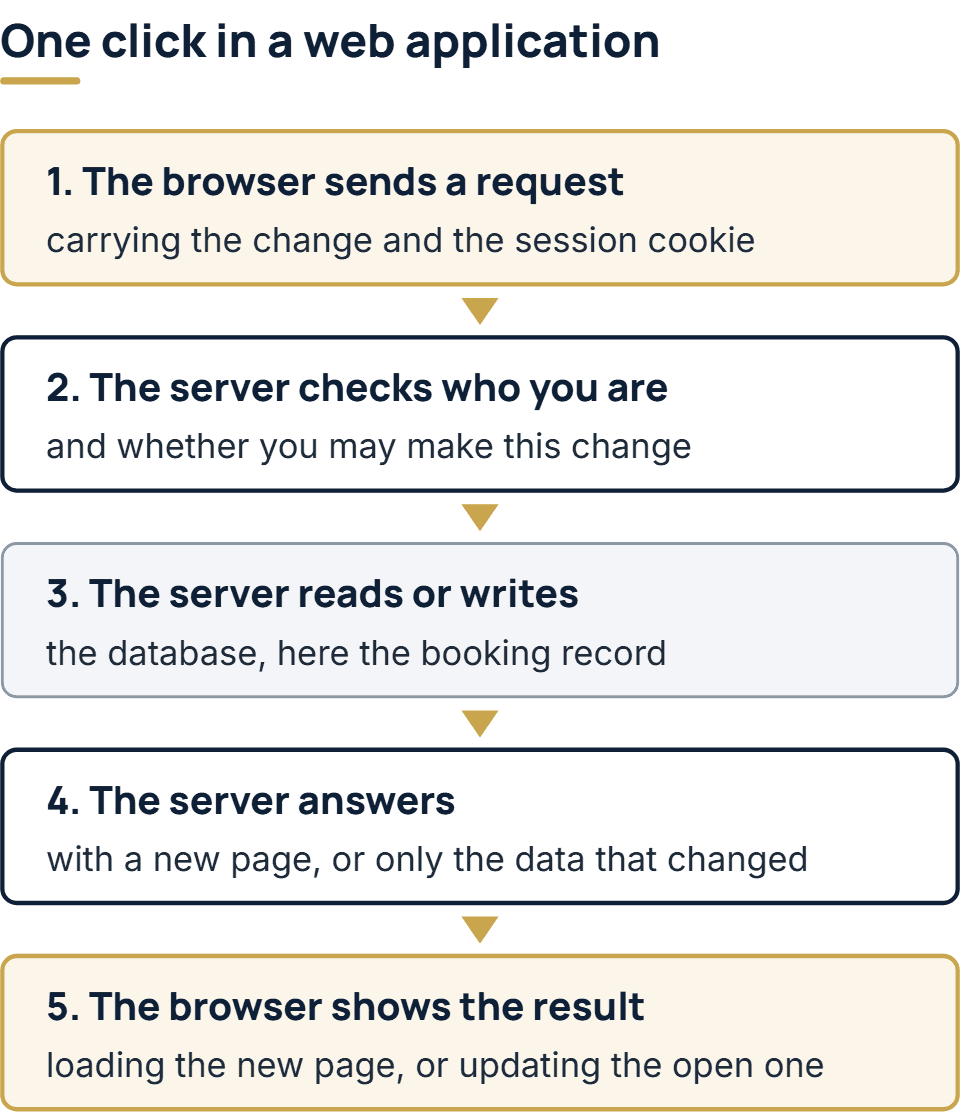
Steps 2 and 3 are what make it an application. Some tools run entirely inside the browser, such as a loan calculator on a bank’s site or a photo editor that never uploads your file. People often call those web apps too, and the line is blurry. This guide means the kind that keeps your data on a server and knows who you are.
The parts of a web application
Whatever language it is written in, a web application is usually made of six parts:
| Part | What it does | In a booking app |
|---|---|---|
| Front end | The screens, forms and buttons, written in HTML, CSS and JavaScript and run by the browser | The calendar a customer picks a time from |
| Back end | Server code that applies the business rules and decides what each request may do | Refusing a time that someone else took a second earlier |
| Database | Keeps the records so they outlast any one visit | Bookings, customers and staff rosters |
| Sign-in and sessions | Identifies each user and keeps them signed in from one request to the next | Separate accounts for customers and for staff |
| Permissions | Decides which records each person may see and change | A customer sees only their own bookings |
| Integrations | Connections to other systems, usually through their APIs | A confirmation email and a text reminder |
All of it runs on a host, behind HTTPS, which encrypts the traffic between browser and server. Which language, framework and database to use for each part is a separate set of decisions, taken one at a time in our guide to building a web app.
Web application vs website
The difference is not the technology. MDN’s client-server overview separates a static site, which sends back identical content whenever a given page is asked for, from a dynamic site, which assembles each response from what was asked and from stored data. That line is useful, but it is not the line between a website and an application. A news site is usually dynamic, since its pages are assembled from a database, yet its readers only read. What makes something an application is what a visitor can do with it.
Three questions settle most cases:
- Does it know who you are? An application usually has accounts, so it can show you your own data.
- Is what you do stored and shown back to you later? A draft, an order, a booking or a setting that is still there tomorrow.
- Do different people see different records? A customer sees their own orders, while staff see everyone’s.
If all three answers are no, it is a website. A yes to the second one means you are dealing with an application, even when most of the pages are public.
| Example | Website or application | Why |
|---|---|---|
| A restaurant’s menu and opening hours | Website | Every visitor reads the same pages |
| A news site | Website | Built from a database, but readers change nothing |
| An online store | Both | The catalog reads like a website; the cart, checkout and account are an application |
| Online banking | Application | Everything on screen is your own data, behind a sign-in |
| A staff scheduling tool | Application | Managers and staff see and change different records |
Plenty of real sites mix the two: public pages that read like a website, plus an area behind a sign-in that works as an application. When you plan or price a project, treat those as two jobs. The public pages are mostly content and design. The signed-in area needs accounts, permissions and a database, and that is where most of the work and most of the risk sit.
Is Amazon a web application?
Yes, in the sense this guide uses. Anyone can browse Amazon’s product pages without signing in, and that part behaves like a very large website. The cart, the checkout, your orders and your account are different: they are stored on Amazon’s servers, tied to you, and waiting whichever browser you sign in from. That is an application. Amazon also publishes apps for phones, so the same service reaches people both as a web application in the browser and as installed apps. Gmail and Google Docs are clearer cases, since almost nothing in them is useful until you sign in.
Examples of web applications
Ten common kinds, with a well-known example where there is one:
- Webmail, such as Gmail opened in a browser.
- Online banking, for balances, transfers and statements.
- Document editors, such as Google Docs, where several people edit one file at the same time.
- Store carts and checkouts, as in the Amazon case above.
- Booking and scheduling systems, for appointments, rooms or staff shifts.
- Customer portals, where clients track an order, download invoices or raise a support request.
- CRM systems, which hold a company’s contacts, deals and conversations.
- Project and task boards, such as Trello.
- Internal admin tools, the screens staff use to manage orders, users or inventory.
- Reporting dashboards, which show figures drawn from a company’s own systems.
The first four are everyday consumer services. Items 5 to 10 are often built for one organization and used only by its staff or its customers, and most web applications written to order fall into those six.
Types of web applications
Two groupings are useful: one by how the pages are built, the other by who uses the app.
By how the pages are built:
| Type | How it works | Typical fit |
|---|---|---|
| Multi-page application | The server sends a fresh HTML page for each click or form | Record lists, forms and account pages |
| Single-page application (SPA) | One page loads once, then JavaScript swaps its content as you work | Editors, boards and screens people stay in for hours |
| Progressive web app (PWA) | A web app with a manifest and a service worker, so it can be installed and can work offline | A web app that people also want on a phone’s home screen |
MDN defines an SPA as a web app that loads a single web document and then updates its content through JavaScript when something different has to be shown. The same entry lists what that costs: harder SEO, more work to keep track of state and navigation, and performance that is harder to monitor. The installable part of a PWA rests on the W3C’s Web Application Manifest, a JSON file that gives the app its name, icons, start address and display mode. In practice most applications mix the first two types, building some screens on the server and others in the browser, and the build guide linked above shows how to decide that per screen.
By who uses it:
| Type | Who uses it | Examples |
|---|---|---|
| Internal tool | A company’s own staff | Admin screens, approval workflows, dashboards |
| Customer portal | A company’s customers or partners | Order tracking, invoices, support requests |
| SaaS product | Many companies, each on a subscription | CRM, project boards, accounting software |
| Consumer app | The general public | Webmail, banking, online stores |
When you are planning one, this second grouping matters more, because it decides how sign-in, permissions and data separation have to work. A SaaS product has to keep each customer company’s data apart from every other company’s, a problem an internal tool never meets.
Web app vs mobile app vs desktop app
| Web app | Mobile app | Desktop app | |
|---|---|---|---|
| How people get it | Open an address in a browser | Download it from an app store | Download and install it |
| Updates | Made on the server; the next visit has them | Released through the store after review, then installed on each phone, often automatically | Installed on each computer, by the user or an auto-updater |
| Offline use | Only if built for it, as a PWA | Usual, for data already on the phone | Usual |
| Camera, location, notifications | Partly, through browser permissions | Full use, with the user’s permission | Broad access to the computer |
| Codebases | One for every device | One per platform, unless a cross-platform framework is used | One per operating system, unless a cross-platform framework is used |
The gap on phones has narrowed. Apple added web push notifications for web apps in iOS and iPadOS 16.4, as WebKit’s announcement of February 2023 explains, but only for a web app the user has first added to the Home Screen. So on an iPhone, a web app can notify only the people who installed it.
Choose by where the work happens. Work done at a desk suits a browser. Work done standing up, in a warehouse or out on a site, that needs the camera, a scanner or has no signal, points to a mobile app or at least a PWA. Many products end up with both, sharing one back end.
Where web applications most often go wrong
The hard part of a web application is checking that every request is allowed. OWASP, the Open Worldwide Application Security Project, ranks broken access control first in its Top 10:2025, the list of the most critical security risks to web applications, and reports that every application it tested had some form of it. A typical case: someone edits the order ID in the address bar and sees another customer’s order, because the server checked that they were signed in but not that the order was theirs.
You can check for this yourself:
- Sign in as two different users, in two different browsers.
- Open one of the first user’s records, copy its address, and paste it into the second user’s browser.
- If the second user sees the record, the app checks sign-in but not permission, and it needs fixing before real data goes in.
- Repeat with roles: sign in as a user with fewer rights and try the addresses of admin pages.
Run it only on an application you own or have written permission to test.
If you need a web application built
Devrisen builds web applications for companies. Our engineers have built internal admin and back-office tools, approval and workflow systems, booking and scheduling systems, customer portals, and reporting dashboards over a company’s existing data. The first call is free. After it we write the scope down, and that document is what the fixed, itemized quote is priced on. If the app has to talk to legacy code or to more than one system already in use, a short paid assessment comes first. You approve the screens as clickable designs, then watch the software take shape at a weekly demo. Under every contract we sign, the code and the intellectual property become your company’s. How a project runs is set out on our web application development services page. Or send us the problem you want an application to solve, and you will have our reply within one business day.
The full service behind this post: Custom Web Application Development Company.
Ready to scope your project?
Send us two sentences about what you need. We reply within one business day with the next step and any questions we need answered first.