
Blog
SaaS product development: the stages and what each decides
SaaS product development means building software many customers rent, and running it for them. The six stages, and the decisions each one settles.
SaaS product development is the work of building software that many separate customers use over the internet and pay for by subscription, and then running that software for them for as long as they stay. The second half is what sets it apart. In the US government’s standard definition, NIST SP 800-145, the customer of a software-as-a-service product uses the provider’s application, reaches it through a browser or a program interface, and manages nothing underneath it apart from a few settings of their own. Everything the customer does not manage, the provider has to build, run and pay for. So a SaaS team is building two things at once: the product customers came for, and the operation that signs them up, bills them, keeps them apart and updates them all without a break.
This guide follows that work in order, from the first question about who will pay through to what to measure once customers arrive, with the decision each stage settles and why it is cheaper settled early.
How do I build a SaaS?
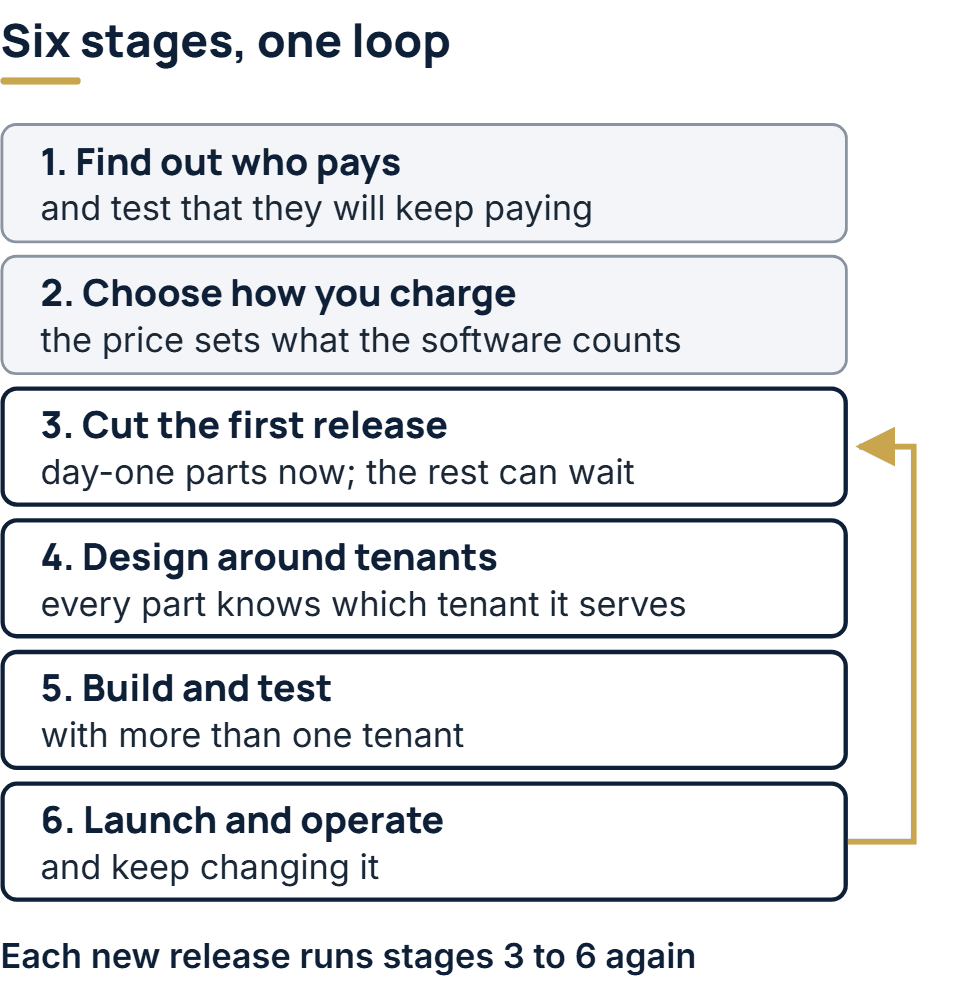
In six stages. The first three are mostly decisions on paper, and they fix much of the cost of the last three:
- Find out who pays, and for what. Name the buyer and the problem, and test that they will keep paying.
- Choose how you charge. The pricing model tells the software what it has to count.
- Cut the first release. Decide which parts must exist on day one and which can wait for a contract that needs them.
- Design the architecture around tenants. Every customer is a tenant, and every part of the system has to know which one it is serving.
- Build and test with more than one tenant. A leak between customers only shows up when two of them are in the same environment.
- Launch, operate and keep changing it. Onboarding, billing and updates run every day from then on.
Launch does not end the sequence. Each new release goes through stages 3 to 6 again, and the pricing model is revisited as the product grows.
Is Netflix a SaaS?
By the letter of NIST’s definition it comes close: Netflix runs the application on its own side, and people reach it through a browser or an app without managing anything beneath it. In ordinary use, though, the term is kept for software a customer pays for in order to do something with it, such as running a sales pipeline or sending invoices. A Netflix subscription buys films and series, and the software is how they arrive, so it is usually called a subscription streaming service rather than SaaS.
ChatGPT fits the definition more cleanly. OpenAI runs the application and everything under it, people use it in a browser or an app, and what they come for is the software’s own output. Other familiar SaaS products include Salesforce for sales teams, Slack for messaging and Shopify for running an online store. NIST’s own example is web-based email.
The distinction matters when you plan a build, because a SaaS product in the narrow sense is usually sold to companies. That brings buyers who are not the daily users, administrators who manage their colleagues’ access, and security reviews before a contract is signed. A consumer subscription meets few of those.
Stage 1: find out who pays, and for what
Validation for a SaaS product asks a harder question than “will someone buy this?”. A subscription is renewed every month or every year, so the real question is whether a customer will still be paying a year from now, after the novelty has worn off and a cheaper tool has asked for the meeting.
For business software, also name three people who are often different: the person who signs the order, the person who sets the account up, and the people who use the product every day. Each one has a reason to cancel. The tests that answer these questions without building the full product, and how to read their results, are explained in our MVP guide. If the doubt is technical rather than commercial, such as whether an integration can be done at all, a proof of concept answers it first.
Stage 2: choose how you charge
Pricing looks like a sales decision, but it is also an engineering one, because the software has to measure whatever you charge for and split that measurement by customer. Microsoft’s Azure Architecture Center sets out the common pricing models for a multitenant product, with the work each one creates:
| Model | What the customer pays for | What the product has to record | The risk Microsoft names |
|---|---|---|---|
| Per user | Each person with an account | User count per tenant | Heavy users cost more to serve than light ones and pay the same |
| Per active user | Each person who signed in during the period | Sign-ins per user, per period | Revenue is harder to predict |
| Per unit | Each device, store or other unit | Units per tenant | A few heavy units can erode the margin |
| Consumption | Usage, such as data or API calls | Every billable event, by tenant, kept for audit | Customers cut usage to cut cost; revenue is uneven |
| Feature tiers | A tier with a set of features or a service level | Which features each tier unlocks | Too many tiers confuse buyers and slow releases |
| Freemium | Nothing, until an upgrade | Free tenants, their limits, and their retention | Paid tiers have to cover the cost of the free one |
| Flat rate | Access for a period | Nothing for billing; usage still worth tracking | Heavy use can make a tenant unprofitable |
The same guide advises keeping to one or two pricing models, each with a small number of tiers, and testing pricing and billing logic automatically like any other part of the system. Two consequences follow for the build. If the price depends on usage, metering belongs in the first release, because an invoice is never more accurate than the events recorded since day one. And whatever the model, recording each tenant’s consumption tells you what it costs to serve, which is the number that says whether a price still works as customers grow.
Stage 3: cut the first release
Most SaaS parts can wait. A few cannot, because adding them after customers arrive means changing data that people are using. This is how we sort them:
| Part | In the first release | Can usually wait |
|---|---|---|
| Tenant ID on every record | Always | Never; retrofitting means touching every table and query |
| Self-serve sign-up | If you sell self-serve | If every sale goes through a call, a scripted setup will do |
| Plans and what each unlocks | The plans you actually sell | Extra tiers, until a second plan exists |
| Usage metering | If the price depends on usage | Otherwise, record the events now and bill later |
| Admin console for your own team | A minimal one: find a tenant, change its plan, suspend it | Reports and bulk tools |
| Single sign-on and directory provisioning | If you sell to enterprises from the start | Until a customer’s contract asks for it |
| Audit log customers can read | Same as single sign-on | Same as single sign-on |
| Dedicated database for one customer | Rarely | Until a contract pays for it; the tenant ID keeps it possible |
The pattern is that structure goes in early and features go in late. A tenant ID costs a column and a filter in the first sprint. A dedicated database, an SSO integration or a second pricing tier can be added when someone needs them, as long as the data model was built to allow them.
Stage 4: SaaS architecture, in two planes
AWS’s SaaS architecture fundamentals whitepaper (now kept as a historical reference) divides a SaaS environment into two planes, and the split is a useful way to see what an estimate has left out.
- The application plane is the product itself: the screens tenants use and the services behind them. Provisioning resources for a new tenant also sits here in AWS’s diagram.
- The control plane is everything that signs tenants up, authenticates them, manages and operates them, and analyzes their use, plus an administration application for your own staff. AWS notes that these services are global to all tenants rather than multi-tenant themselves.
Demos show the application plane. The control plane is invisible to a prospect and still has to exist before the first customer pays, which is why it is so often missing from early plans.
The second idea from the same whitepaper is that tenant isolation is separate from sign-in. A user can be authenticated and authorized and still reach another tenant’s resources, because nothing in a login decides which company’s data a request may touch. Isolation comes from tenant context, in AWS’s phrase. In practice that means the tenant is taken from the signed-in identity, never from a URL or a form field, and it travels with every query, cache key, stored file and background job. How strongly that separation is enforced, from one shared database to a database for each customer, is the tenancy decision, and it belongs at this stage because changing it later means moving customers’ data while they work. Breaking the code up into services is another decision, usually made later; microservices and containers covers when it pays.
Stage 5: build and test with more than one tenant
From the first sprint, every test environment should hold at least two tenants whose data looks alike: the same user names, the same project titles, overlapping IDs. Then add automated tests that log in as the first tenant and attempt to open, edit or download records belonging to the second. A leak between customers is the fault a SaaS product can least afford, and it stays invisible in an environment that only ever contains one company.
Three more things deserve tests of their own here. Billing logic, since a plan change or a failed payment touches both the product and the billing provider. Limits, because in a shared system one tenant’s bulk import can slow everyone else; Microsoft’s guide recommends usage limits such as API rate limits, made known to customers before they apply. And updates, which brings in the release process. Microsoft’s guidance on updating a multitenant solution says that for SaaS, planned outage windows are now generally regarded as out of date, and that the system has to be designed for zero-downtime deployments from the start. It describes rolling a release out in rings, from a canary ring of your own test tenants and willing customers through early adopters to everyone else, with feature flags to hide work until it is ready. For the wider testing picture, see the levels of testing.
Stage 6: launch, operate and keep changing it
Launch day needs the whole customer journey working without anyone from your team stepping in: sign up, create the tenant and its first administrator, start a trial, invite a colleague, pay, change plan, cancel.
The billing part of that journey has more states than most plans allow for. Stripe, as one example, gives every subscription a status, and the product needs a rule for each:
| Stripe status | What it means | What the product should do |
|---|---|---|
trialing | In a trial period | Full access for the trial; Stripe says it is safe to provision |
active | In good standing | Full access |
incomplete | The first payment has not succeeded yet, with 23 hours to complete it | Hold access until it succeeds |
past_due | The latest payment failed or was not attempted | Keep access for a set grace period and tell the customer |
unpaid | Retries are over and invoices remain unsettled | Revoke access, as Stripe advises; keep the data |
canceled | Ended; this cannot be undone | Close access, start the retention clock |
paused | The trial ended with no payment method on file, and the account is set to pause in that case | Limit access until a payment method is added |
The right-hand column is our recommendation, not Stripe’s, except where the table says otherwise. Other billing platforms name their states differently, but the questions are the same.
Leaving matters as much as joining. Microsoft’s tenant life cycle guidance separates deactivation, a temporary state such as a customer who cannot be billed, from offboarding, and says to decide how long data is kept and whether a departed customer can return to it.
Once customers are using the product, measure two kinds of things, and measure both per tenant, because an average across all tenants hides the one having a bad week.
- Service levels. Google’s SRE book defines a service level indicator as a quantitative measure of some aspect of the service, and an objective as a target for it. Its advice is to start from what users care about, not from what you can measure, and to keep the list short.
- The business. Activation: how many new tenants reach their first useful result. Churn: how many paying tenants leave in a period. Revenue retention: whether existing customers pay more or less over time. Cost to serve each tenant, from the consumption records of stage 2.
Those numbers then feed the next release, and the cycle starts again at stage 3.
How we build SaaS products
Our SaaS development services start with those costly decisions. In scoping, before anyone estimates the build, we agree how you will charge, how tenants are kept apart and what version one leaves for later. A new product is scoped free of charge, while software that already exists gets a brief paid audit first. Either route ends in a fixed quote itemized by component, so single sign-on or metered billing can be moved to a later release deliberately. Whoever scopes your product also builds it, and each week brings a demo of working software. We pick the tenant model during architecture and record why we chose it. Handover includes documentation of the architecture and the tenant model, plus a runbook. Under every contract we sign, ownership of the code and of the intellectual property passes to you, and the repository and the cloud and billing accounts are opened in your company’s name.
The full service behind this post: SaaS Development Company & Services.
Ready to scope your project?
Send us two sentences about what you need. We reply within one business day with the next step and any questions we need answered first.