
Blog
User story mapping: how to build one and cut a first release
A user story map lays a product out as the steps people take, with the work for each step beneath. Here is how to build one and cut a first release.
A backlog is usually a list. Each item makes sense on its own, but the list as a whole says little about what the product does for the person using it, and it is hard to tell what is missing. A user story map lays the same work out in two directions: across the page in the order a person uses the product, and down the page by how much each piece matters. Seen that way, the whole product fits on one wall, the gaps show, and choosing what goes into the first release becomes a matter of drawing a line.
The technique was popularized by Jeff Patton, who set it out in his 2008 article “The New User Story Backlog is a Map”. This guide covers what goes on a map, how to build one in a working session, and how to use it to cut a first release, with one worked example.
What a user story map is
A user story is a small piece of what a product should do, written from the point of view of the person who needs it, often in the form “As a [kind of user], I want [something] so that [reason].” A story map arranges those stories under the steps of a user’s journey.
Across the top runs the backbone: the big things people do with the product, left to right in the order they do them. Patton’s test for that order is a simple one. It is the order you would use to explain the product to someone out loud. Under each activity sit the smaller steps that make it up, and under each step hang the stories, the most necessary at the top and the nice-to-haves further down.
What the map adds to a flat list is context. A story such as “filter shifts by day” means little by itself. Placed under “find a shift”, beside the stories that make finding a shift possible at all, it is easy to judge whether it belongs in the first version.
The parts of a story map
- Users. Who the map is about. Products with more than one kind of user can put all their activities on one backbone.
- Activities. The large things people do, such as finding a shift or signing up. Together they form the backbone, and they are not ranked against each other: the product needs all of them.
- Steps. The tasks within each activity, in order. Patton calls these user tasks.
- Stories. The pieces of work under each step, ordered from most to least necessary.
- Release lines. Horizontal lines drawn across the whole map. Everything above the first line is the first release, the band below it is the second, and so on.
The top row of stories, across every activity, is what Patton calls the walking skeleton, a term he takes from Alistair Cockburn: the smallest version of the product that works from start to finish.
How to build a user story map
A first map can be made in one working session, with sticky notes on a wall or cards on a shared online board.
- Frame it. Write down who the product is for and what problem it solves for them.
- Walk the journey. Have the group tell the story of one person using the product from start to finish, and put each big thing they do on a card, left to right. That row becomes the backbone.
- Break activities into steps. Under each activity, add the steps a person takes, still in order. Read the row aloud. If the story jumps, a step is missing.
- Add the stories. Under each step, write the pieces of work that make it possible. Go wide first: cover every step thinly before going deep on any one of them.
- Order each column. Move the most necessary story to the top of its column and the optional ones lower. Compare stories only within their own column, never across the map.
- Draw the release lines. Starting from the top, draw a line under the smallest set of stories that still lets a person get from the first activity to the last.
Who is in the room matters as much as the steps: the people who know the users, the people who will build the product and, where possible, a few of the users themselves. Patton notes that walking the map with users turns up steps the team had missed, and that users often correct the map as it is built.
A worked example: a volunteer sign-up app
Take an invented product: a web app a food bank uses to fill its volunteer shifts, which today are posted in a group chat and tracked in a spreadsheet. Two kinds of user share the map, the coordinator who posts shifts and the volunteers who fill them.
The backbone, left to right, is post shifts, find a shift, sign up, get reminded and turn up on the day. Under each activity, most necessary first:
- Post shifts: add a shift with its date, time and number of places. Later: copy last week’s shifts, and mark a shift that needs a skill such as driving.
- Find a shift: see the open shifts as a list. Later: filter by day, and see who else has signed up.
- Sign up: sign up with a name and an email address. Later: cancel a sign-up, and sign up for a shift that repeats every week.
- Get reminded: an email confirming the sign-up. Later: a reminder the day before, and reminders by text message.
- Turn up on the day: a printable list of names for the shift lead. Later: check in on a phone, and keep a record of hours given.
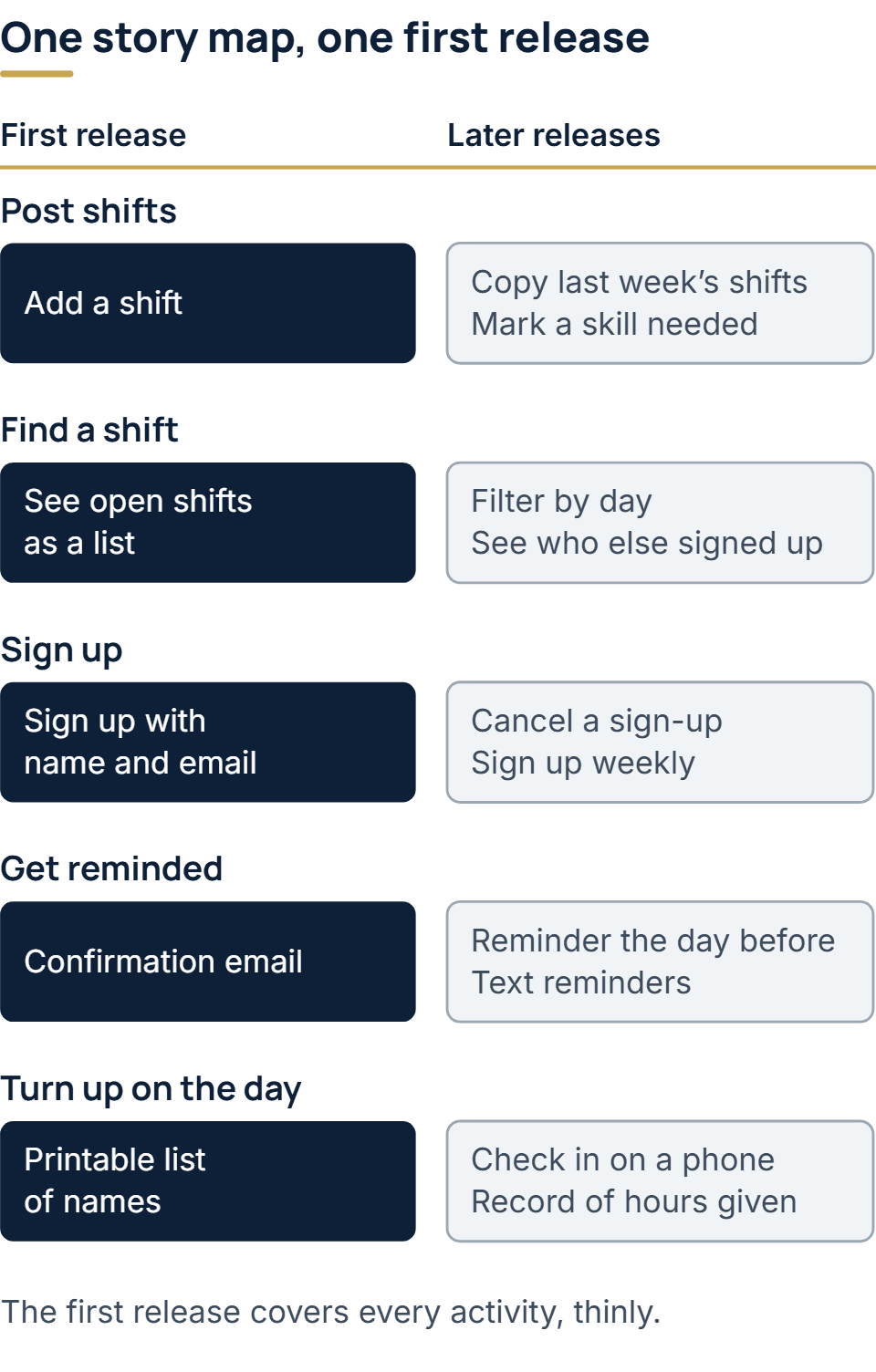
The first release is the top row and nothing else. A coordinator can post a shift, a volunteer can find it, sign up and get a confirmation, and the shift lead has a list on the day. The reminder the day before sits below the line: for the first few weeks the coordinator can send it by hand from the list, and how often people forget will show whether automating it deserves a place in the next release.
Cutting the first release
A first release exists to find out, with as little built as possible, whether the product’s central idea holds. For the volunteer app, the riskiest assumption is not a technical one. It is whether volunteers will sign up through a link at all, rather than replying in the group chat as they always have. The top row of the map is enough to test that. Copying shifts, filters and text reminders would not make the answer any clearer. A first release built this way is a minimum viable product, and our guide to what an MVP is covers the kinds that need no code at all and how to set a target before launch.
A few rules help when drawing the first line:
- It has to work end to end. A release that lets volunteers sign up but gives the coordinator no way to see who signed up tests nothing.
- Thin across beats deep in one place. Five activities done simply are worth more than one done fully and four missing.
- Manual steps are allowed. Where a person can do a step by hand for a while, such as sending reminders, the story can usually wait.
- Name what each release should teach you. A release with no question attached is hard to judge afterwards.
The same thinking sits behind any first version built to learn. On our MVP development projects, Scope week comes before any code and produces three things: the riskiest assumption in the product, the smallest set of features that tests it, and a fixed price and date for building that set.
When the product is a web app, our guide to how to build a web app takes the first release from the map through rendering, sign-in, testing and launch.
Common mistakes
- Mapping the system instead of the user. A backbone of “login, database, admin panel” describes software parts, not a journey. Activities should be things a user would say they are doing.
- Going deep before going wide. Detailing every story under the first activity before the backbone is finished hides the gaps the map is there to show.
- Leaving the map on the wall. A map made once and never touched again goes stale.
Story map, backlog and spec
A story map does not replace a backlog. Read left to right and top to bottom, it produces an ordered backlog with the context still attached. Nor does it replace a written specification where one is needed: stories describe what people need to do, while a specification also records constraints, roles and how well the product must perform. Our SRS document template shows what a specification contains and where stories fit into it.
The map stays useful after launch. For a product that keeps shipping, such as a SaaS product sold by subscription, it is where new stories are placed and the next release line is drawn, so each addition is judged against the whole journey rather than on its own.
Questions people ask
What is the difference between a story map and a customer journey map?
A customer journey map usually describes a person’s experience with a service, including moments outside the product, to find problems worth solving. A story map describes what the product will let people do and the work that takes, to plan what to build and in what order. A journey map can be a good starting point for the backbone.
What tools do you need for user story mapping?
Sticky notes and a wall are enough. A team that is not in one room can use an online whiteboard or a backlog tool with a story map view. The value is in the conversation while the map is built, not in the tool.
When should a story map be updated?
Whenever something is learned: after each release, when users show that a step is missing, or when a story turns out to matter more or less than expected. Moving cards is cheap, and keeping the map current is what keeps it useful.
The full service behind this post: MVP Development Services for Startups.
Ready to scope your project?
Send us two sentences about what you need. We reply within one business day with the next step and any questions we need answered first.